Evolving the Threat Hunter Playbook 🏹: Planning Hunts with Agent Skills 🤖
This post shows how the Threat Hunter Playbook can be extended with Agent Skills to structure hunt planning for AI agents, describing known workflows and using progressive disclosure so agents can access knowledge at the right time.


Almost a decade ago, we started working on what eventually became The Threat Hunter Playbook. Back then, we were trying to document how hunters think and the structure that surrounds a hunt before, during, and after. That process started with understanding the data being collected and the fundamentals of the technology or systems a threat actor could abuse. With that foundation, the research phase became more effective, making it easier to reason about adversary tradecraft, identify realistic attack patterns, and avoid broad generalizations. Those behaviors could then be mapped to observable signals. Finally, understanding expected behavior, potential false positives, and organizational context helped translate those ideas into the queries used during a hunt.
Around that time, we explored Jupyter notebooks, which were rarely used by threat hunters and mostly associated with data analysts in other domains. Notebooks allowed hunts to be treated as executable documents that combined markdown, analytics, datasets, and validation queries. This reinforced the idea that hunts were about structure and reasoning rather than just results, shaping how the project evolved and how hunting knowledge could be shared and reused.
Fast forward to today, and the rise of AI agents across multiple domains is hard to ignore. Agents can reason in natural language, generate hunt queries, iterate over results, and decide what to do next. But threat hunting cannot just be free form. The hunting lifecycle has structure. There are moments where exploration and iterative reasoning over results make sense, but there are also clear steps during planning, execution, and reporting where discipline and consistency matter. Without that structure, speed quickly turns into noise.
The goal of this blog post is not to teach you how to hunt in your environment or to share hunting queries. Instead, we want to take the framework behind The Threat Hunter Playbook and show how it can be expressed as workflows that both human hunters and AI agents can follow. The project could describe a full hunting lifecycle through its executable notebook structure for planning, execution, and reporting, but its primary goal was to provide structure for planning and reasoning before execution begins. Notebooks allowed that structure to carry into execution by capturing intent, notes, and reasoning behind each query, while leaving execution and reporting decisions to the hunter. In this post, we focus on describing the planning workflows from the project as Agent Skills that can be applied across many hunts.
Agent Skills 📝
To make this framework actionable for AI agents, we needed a way to share threat hunting planning workflows so they can be discovered, loaded, and applied consistently. One approach we found interesting is Agent Skills. Skills provide a way to package workflows, instructions, and supporting resources so an agent can decide when to use them, rather than relying on long, repeated prompts. As we worked through extending the project, learning and experimenting with this model felt like a natural next step, much like exploring notebooks years ago.
This pattern is converging across ecosystems. Anthropic uses Agent skills in Claude Code, OpenAI applies similar concepts through Codex, and GitHub Copilot has now adopted Agent Skills as well, making them easy to use through Visual Studio Code (version 1.108).
What Goes Into an Agent Skill
At a minimum, an Agent Skill would include three core elements:
- Workflow instructions
Clear guidance on what the task does, when it should be used, and how it should be executed. This mirrors how a human would approach a task step by step, not just the final outcome. - Structured templates and artifacts
Reusable templates that define how information should be captured. These templates ensure outputs are consistent and usable across tasks. - Supporting references and tools
Links to knowledge or tooling that the agent may need to complete the workflow. This may include references to data catalogs, or services exposed through MCP, rather than embedding all context directly.
Together, these elements allow an agent to recognize when a workflow applies, gather context, and produce outputs that fit naturally into the rest of a task. Skills do not remove decision making. They provide structure around it.
Agent Skills Environment
To make this concrete, the examples in this post use GitHub Copilot in agent mode within Visual Studio Code, focusing on how the agent discovers, loads, and executes Agent Skills rather than general autonomous coding behaviors.
Requirements:
- GitHub Copilot plan that supports agent mode
(Copilot Pro, Pro+, Business, or Enterprise) - Visual Studio Code (version 1.108)
- GitHub Copilot enabled in VS Code
- Agent Skills enabled via the chat.useAgentSkills enabled.
A Minimal Agent Skill Example
With the environment in place, the next step is to look at the smallest possible Agent Skill. The goal of this example is not to build anything useful yet, but to make the mechanics of skill discovery and execution visible before applying the pattern to real threat hunting workflows.
Skill Structure
In VS Code, a skill is simply a folder on disk with a required SKILL.md file inside a valid skills directory. Nothing more is required. You can create the minimal structure with a few shell commands:
mkdir -p .github/skills/hello-skill
touch .github/skills/hello-skill/SKILL.md
That produces the following layout:
.github/
└── skills/
    └── hello-skill/
        └── SKILL.md
The Smallest Possible SKILL.md
Open the SKILL.md file and paste the following content:
---
name: hello-skill
description: Validate that Agent Skills execution is working by responding with a fixed message. Use only when the user explicitly asks to run or test the hello-skill.
---

When this skill is used:

1. Respond with:
   "Hello from an Agent Skill. Skills are working."

2. Briefly explain in one sentence that:
   - The agent matched the request to the hello-skill by name
   - Loaded the skill instructions
   - Executed them exactly as written

3. Ask the user what workflow they would like to formalize as an Agent Skill next.
This is a valid skill. It has no tools, no scripts, and no dependencies. Its only purpose is to confirm that skills are wired up correctly.
Discover Agent Skills
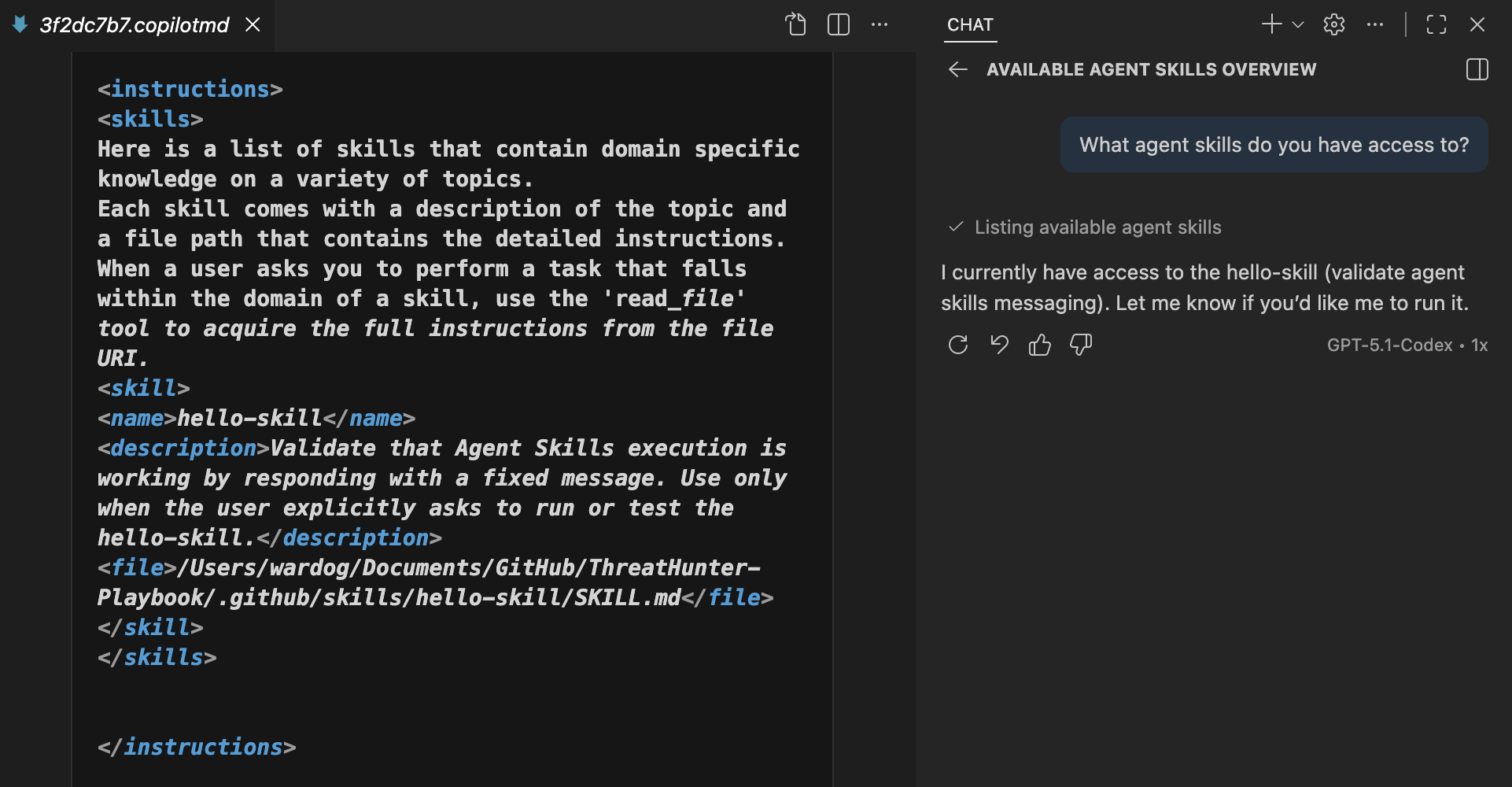
In Visual Studio Code with GitHub Copilot in agent mode, you can ask “What agent skills do you have access to?” and inspect the Chat Debug view to see how skills are provided to the agent. The debug view shows a dedicated <skills> section injected into the system prompt, which contains the metadata and instructions the agent uses to recognize and execute Agent Skills.
Invoke Agent Skills
Agent Skills are invoked through natural language prompts. A skill can be triggered either explicitly, by directly asking the agent to run or test a specific skill, or implicitly, when the user’s request clearly matches the intent described by the skill and the agent determines it should be applied.
Can you validate that Agent Skills execution is working?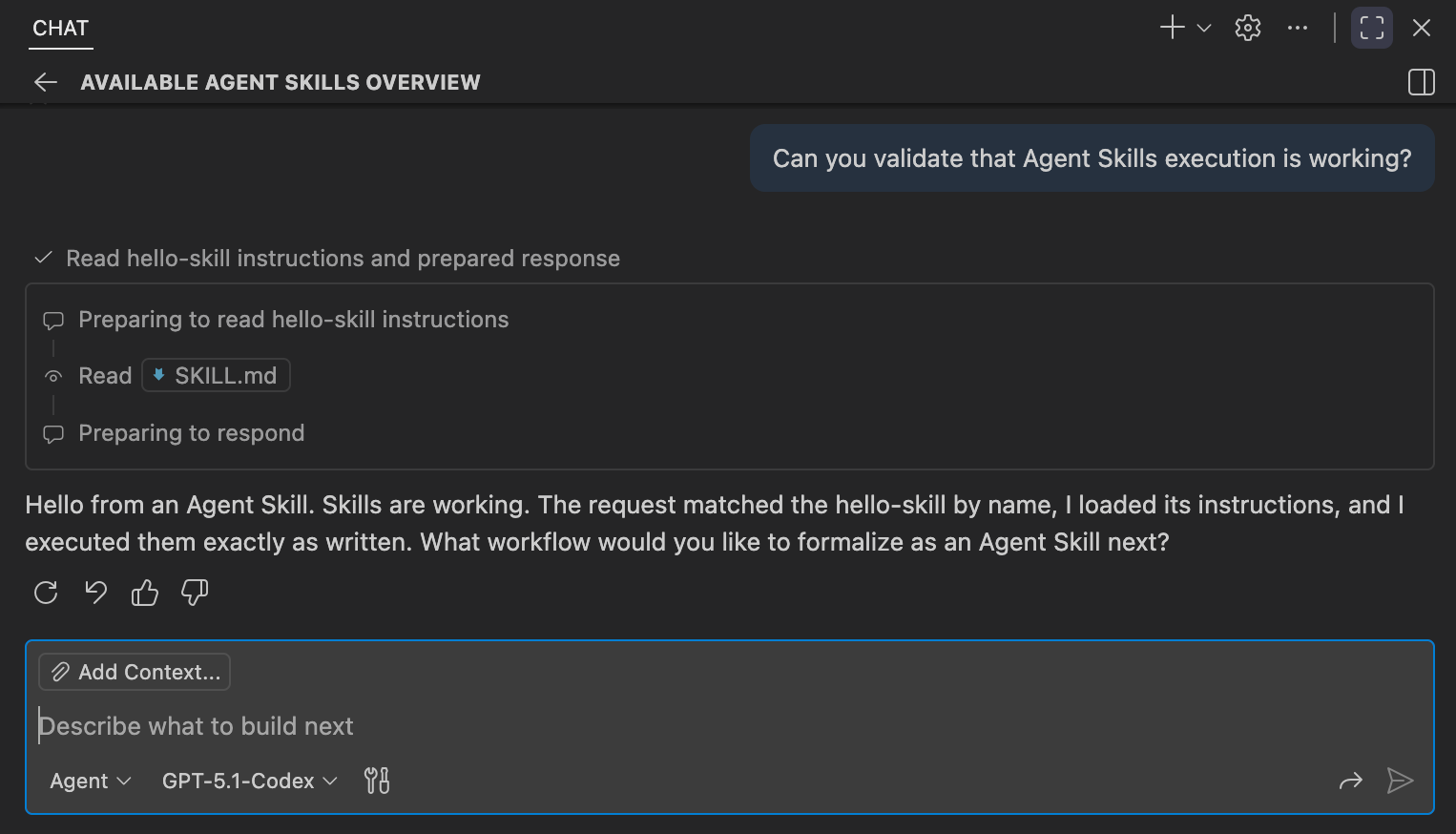
This example is intentionally small, but it establishes the core model. Skills let agents reliably recognize when a workflow applies and follow it consistently. With the mechanics in place, the next question is which workflows from the Threat Hunter Playbook make sense to formalize as Agent Skills.
The Threat Hunter Playbook as a Framework 📝
The project was organized around a simple idea: threat hunting follows a lifecycle grounded in shared understanding of the environment, system internals, and adversary tradecraft. That shared understanding informs how hunts are planned, how execution is guided and interpreted, and how findings are documented.
At a high level, the framework describes three core stages:
Plan
Build the context and analytic intent of the hunt before touching data. Define the behavior being hunted, the assumptions and expected activity, and the analytics that model how the behavior should appear in telemetry. Then express those analytics as hunt queries for the specific data sources and query engines in use.
Execute
Apply the plan to the environment by running queries, analyzing results, and iterating as assumptions are tested and new context emerges.
Report
Capture what was learned regardless of outcome, including findings, expected behavior, false positives, visibility gaps, and follow up actions.
While the framework spans the full lifecycle, this post focuses on the planning stage, where most of the structure and intent of a hunt is created. Execution and reporting follow the same workflow mindset, but they are intentionally left out of scope here and will be covered separately in future posts.
Agents Within the Threat Hunter Playbook 🤖
Hunting depends on access to the right context throughout the lifecycle of a hunt, and that context evolves as assumptions are tested and new information emerges. Agents support evolving hunt trajectories rather than reacting to ad hoc queries.
From the beginning, the Threat Hunter Playbook was designed to make the reasoning behind a hunt explicit. It encouraged capturing intent, notes, interpretation of results, and outcomes, documenting the trajectories taken during an investigation. Seen this way, threat hunting consists of repeatable workflows that can be documented and shared as structured guidance, with defined steps and templates that agents can follow.
Agents Planning the Hunt 🤖📚
Planning is where most of the structure and intent of a hunt is created. Before any data is queried, hunters need to build enough understanding to scope realistic attack behavior, avoid noise, and make assumptions explicit. This is also where agents can provide the most value by helping gather context, shape intent, and assemble the artifacts that guide execution.
Planning in the Threat Hunter Playbook follows a set of repeatable workflows:
- Researching technology and adversary tradecraft
- Defining the hunt focus
- Identifying relevant data sources
- Developing analytics
- Producing a hunt blueprint
Integrating MCP Servers
To support research and data-driven investigation workflows, we will integrate two Model Context Protocol (MCP) servers that allow the agent to access external knowledge and security data through natural language.
- Tavily MCP Server
Used for optimized web search during research and planning, allowing the agent to retrieve up-to-date external information, references, and background context needed to inform investigative workflows. - Microsoft Sentinel MCP Server (Data Exploration collection)
Used to discover and explore security data sources within Microsoft Sentinel’s data lake. Specifically, thesearch_tablescapability which enables semantic discovery of relevant tables and schema information, helping the agent identify appropriate data sources before writing queries.
Step 1: Create an .env File and Set the API Key
- Start by creating an
.envin your current directory. - Add your Tavily API key inside the
.envfile:
TAVILY_API_KEY="your-api-key-here"
You can get your own Tavily API Key from tavily.com.
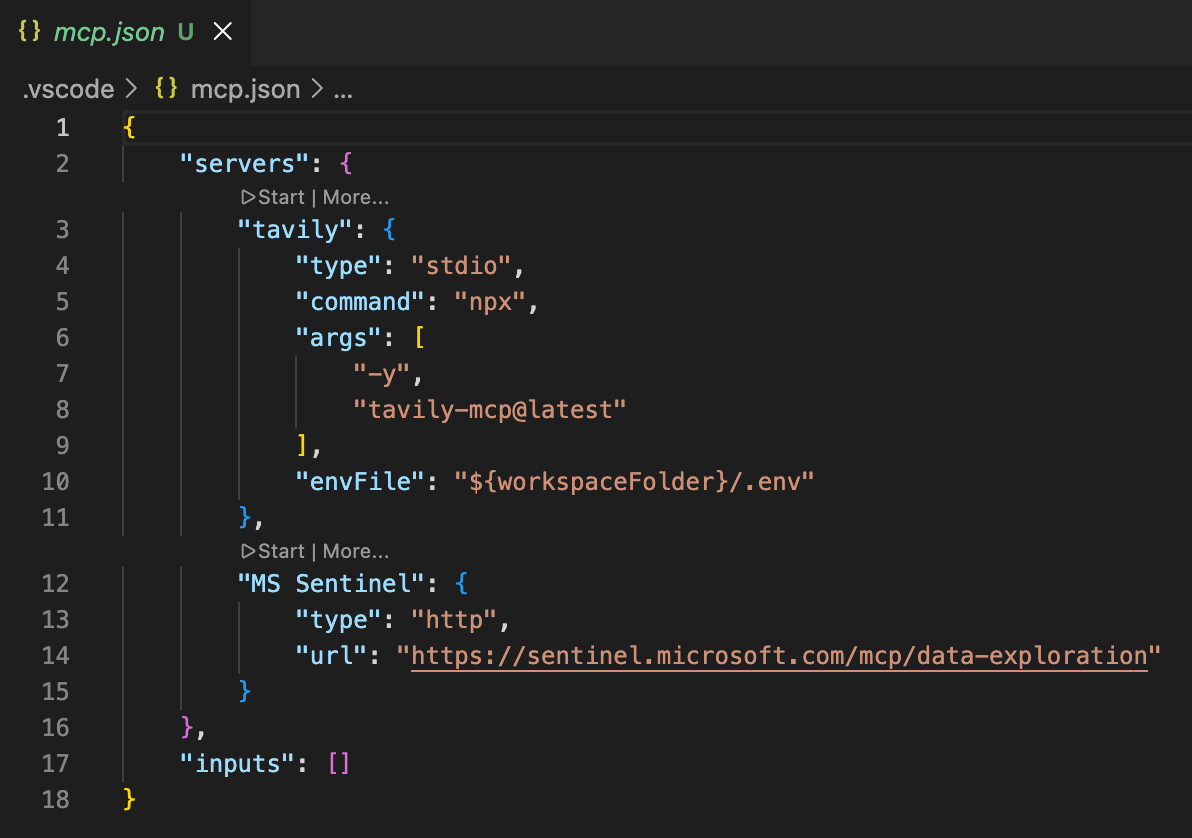
Step 2: Set Up VS Code's MCP Server Config
- Create an
mcp.jsonfile inside of the.vscodefolder in your workspace. - Add the following to set up the define both MCP servers.
{
  "servers": {
    "tavily": {
    	"type": "stdio",
		"command": "npx",
		"args": [
          "-y",
          "tavily-mcp@latest"
		],
		"envFile": "${workspaceFolder}/.env"
    },
    "MS Sentinel": {
      "type": "http",
      "url": "https://sentinel.microsoft.com/mcp/data-exploration"
    }
  },
  "inputs": []
}- Start the servers by hovering over their names and clicking Start. The Tavily server uses the API key from your
.envfile, while the Microsoft Sentinel server initiates an authentication flow. Authenticate with the account that has access to your MS Sentinel Data Lake.
Step 3: Test MCP Servers
Search the web for Kerberos abuse techniques.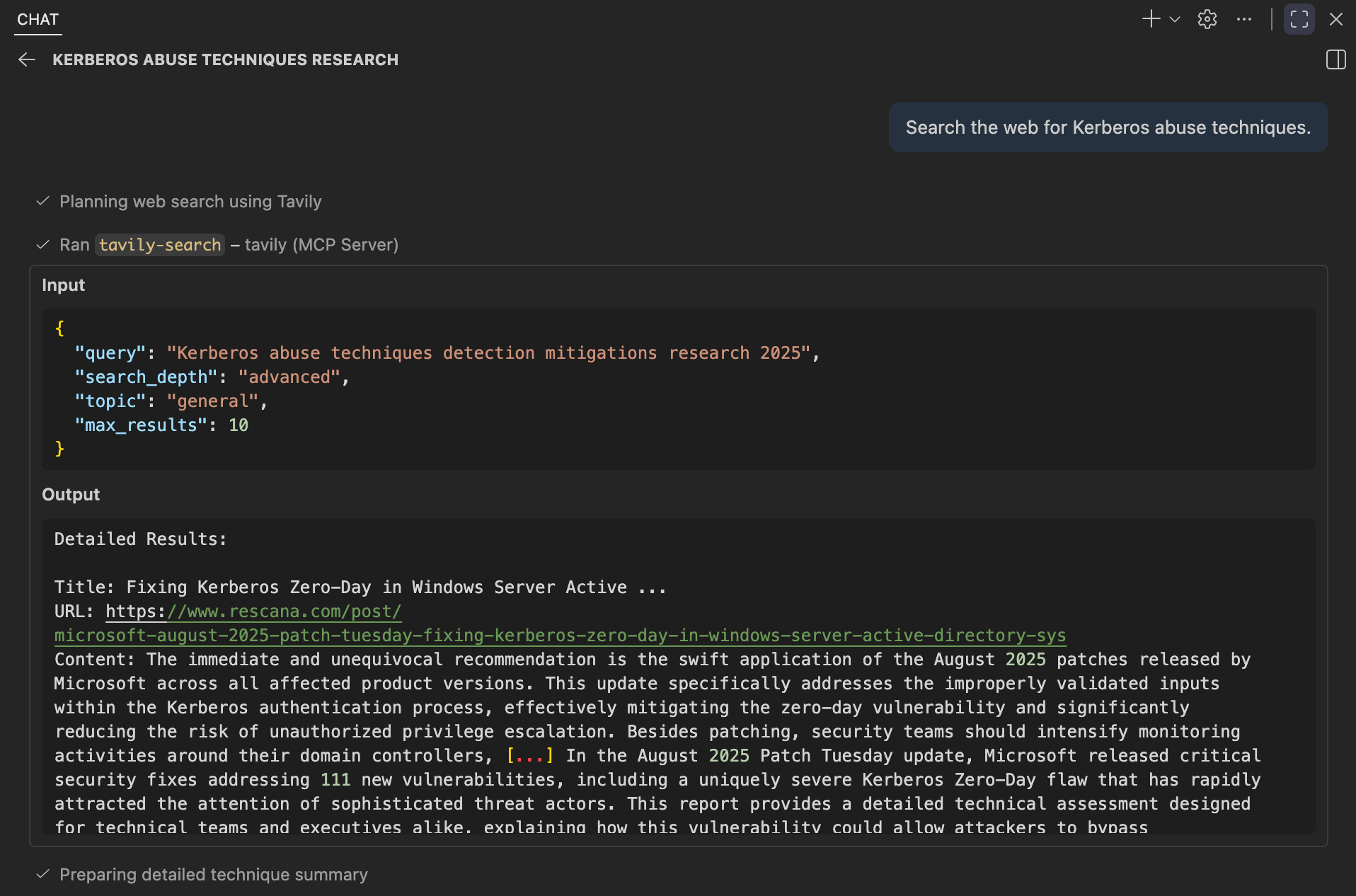
Search for data tables related to user authentication.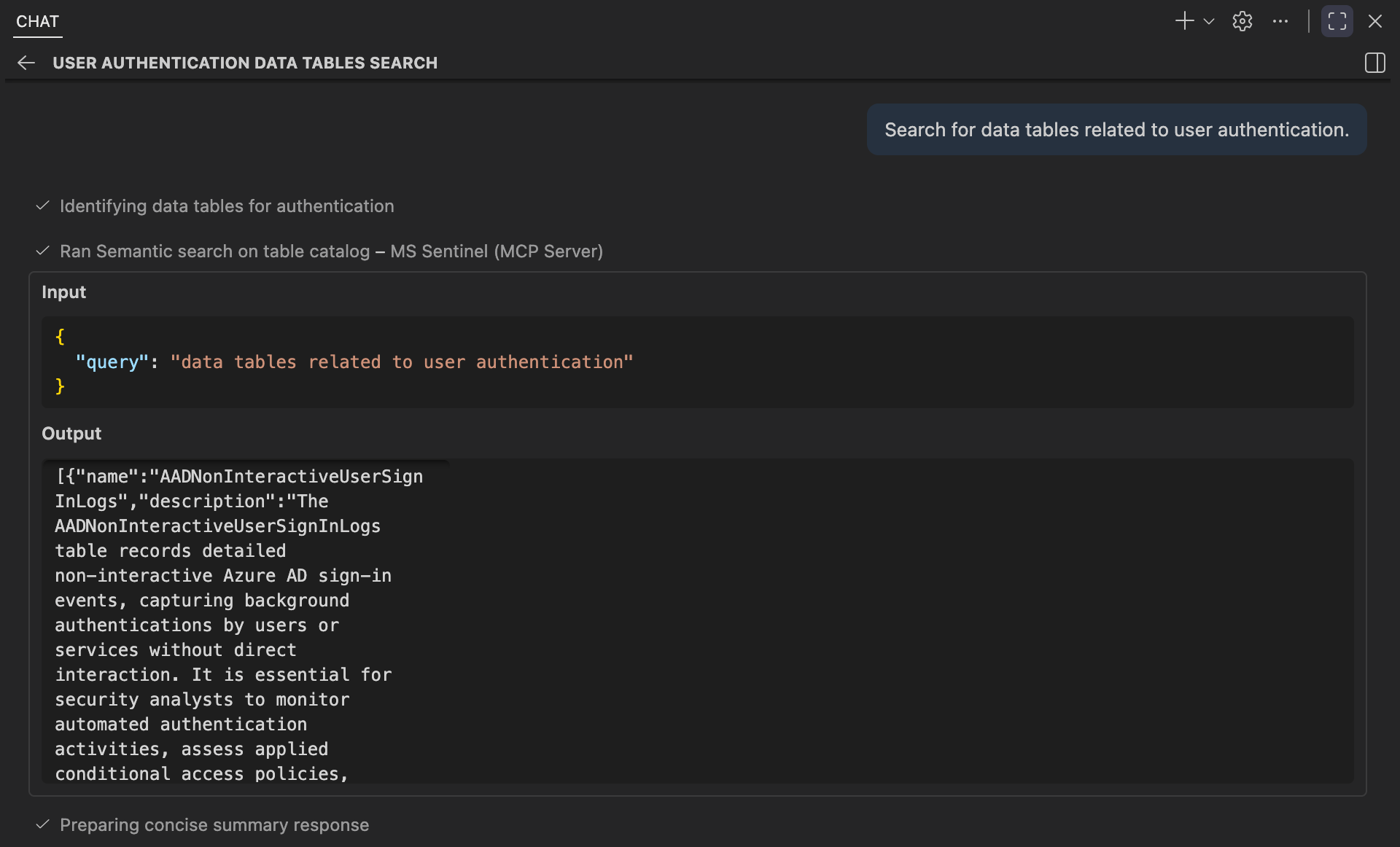
With this setup, the agent can leverage optimized web search alongside data source discovery, enabling it to gather the context needed based on investigative intent.
Researching Technology and Adversary Tradecraft 🤖📝
Before modeling behavior or writing analytics, hunters need to understand how the technology in scope operates and how adversaries realistically exploit it. This includes understanding the normal system behavior, common configurations, telemetry generation, and the potential classes of abuse within the environment.
This planning phase can be implemented as a single Agent Skill invoked early in a hunt, once a behavior, technique, or system feature is identified. The initial input is often broad, such as “hunt for WMI abuse” or “Kerberos misuse,” which are acceptable and realistic starting points.
Regardless of whether the input is specific or broad, the skill should focus on identifying the underlying system, feature, or service in scope. The goal is to ensure that the internal workings of the system are understood before diving into adversary tradecraft. Once the system internals are clearly defined, the skill then focuses on the adversarial abuse of those internals, answering key questions like:
- How does the system/feature work under normal conditions?
- How can adversaries manipulate those internals to achieve their goals?
The skill does not produce queries or detections until a clear understanding of system behavior and adversary tactics is formed. The output will inform later planning steps, such as the definition of the hunt focus, identification of data sources to hunt with, and developing analytics to model the attacker behavior.
High-Level Workflow
At a high level, the skill follows a repeatable workflow:
- Normalize the Input: Clarify the technology, feature, or system in scope. Broad prompts like "WMI abuse" are acceptable starting points.
- Build System Internals Context: Research the normal behavior, dependencies, and telemetry surfaces of the system in question.
- Build Adversary Tradecraft Context: Research adversary techniques and realistic abuse patterns of the system internals.
- Decompose into Candidate Patterns: Identify the top abuse patterns (ideally 3-5) to focus the hunt on.
- Capture Assumptions, Gaps, and Sources: Explicitly document any assumptions, unknowns, and the sources used for reference.
Skill Artifacts
This workflow is packaged with the following supporting artifacts:
- SKILL.md: Defines when the skill should be invoked and enforces the step-by-step research workflow the agent must follow.
- References:
- Web Search Query Guide: Provides a lightweight "broad -> narrow" approach for generating focused, high-value research queries.
- System Internals Research Guide: Guides the agent in documenting how a system works under normal conditions, including capabilities, dependencies, trust assumptions, and telemetry surfaces.
- Adversary Tradecraft Research Guide: Guides the agent in describing how adversaries operationally abuse system capabilities in a tool-agnostic, behavior-focused way.
- Research Summary Template: Defines the final synthesis structure that integrates system internals, adversary tradecraft, candidate attack patterns, assumptions, and sources.
- Citations Guide: Establishes consistent rules for recording and organizing sources to ensure transparency, traceability, and auditability.
Each artifact links to a corresponding file within the skill's folder, ensuring the skill remains lightweight while maintaining consistent outputs that are reusable.
Repository: https://github.com/OTRF/ThreatHunter-Playbook/tree/main/.github/skills/hunt-research-system-and-tradecraft
.github/
└── skills/
    └── hunt-research-system-and-tradecraft/
        ├── SKILL.md
        └── references
            ├── tavily-search-guide.md
            ├── system-internals-research-guide.md
            ├── adversary-tradecraft-research-guide.md
            ├── research-summary-template.md
            └── research-citations-guide.md
Testing Agent Skill
Let's start by providing a hunt topic, have our agent follow the skill, and monitor the workflow execution.
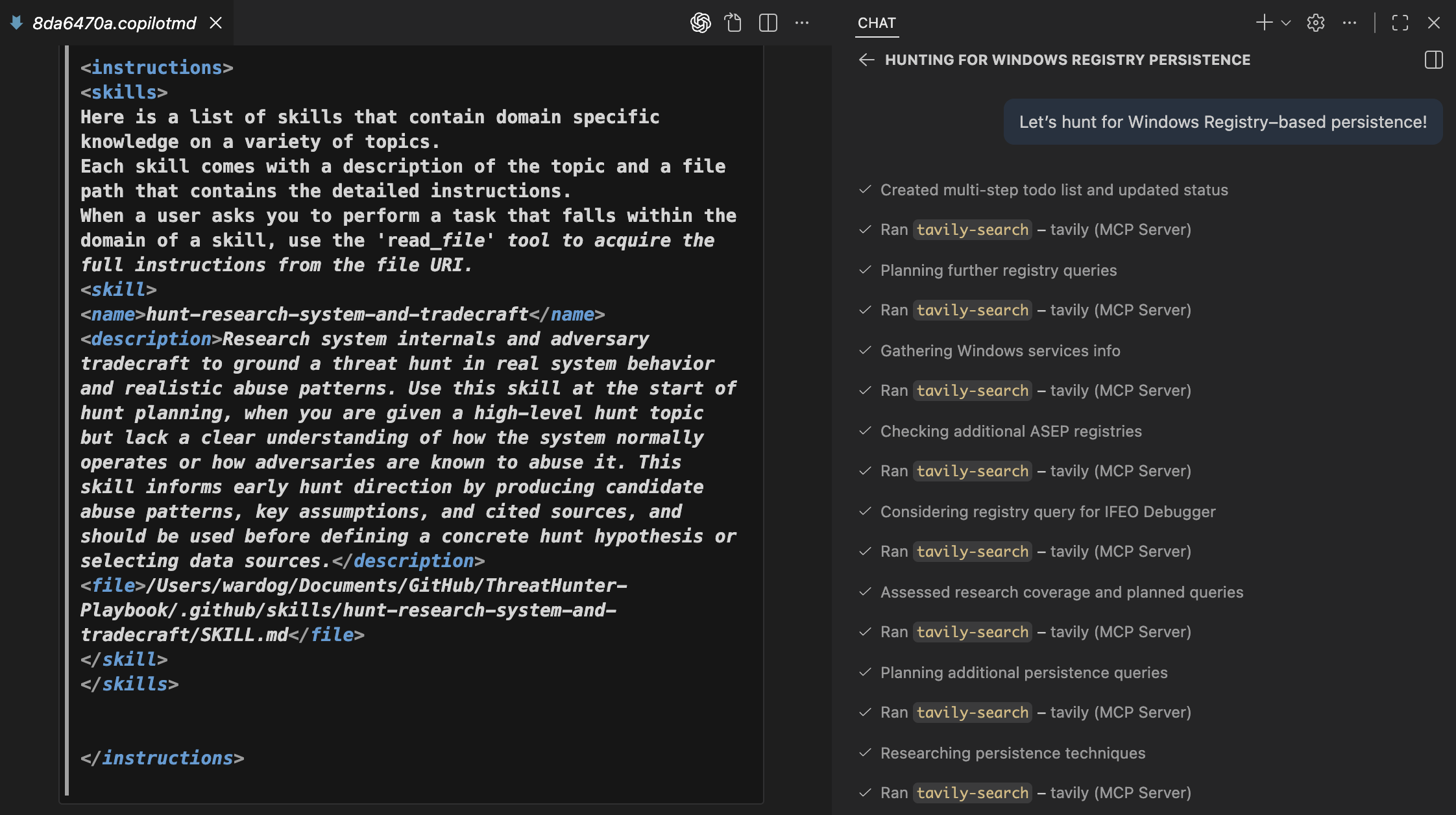
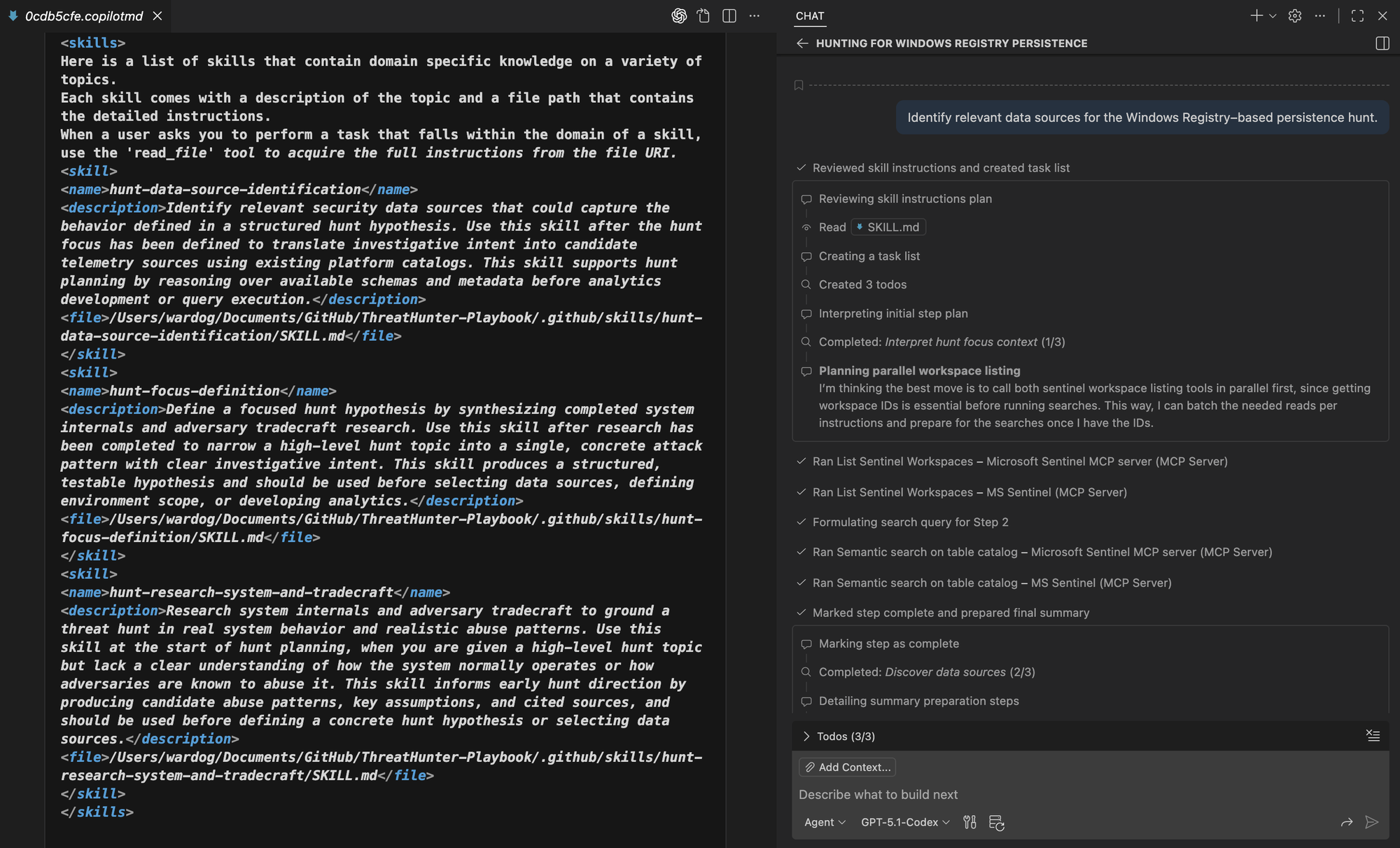
Let’s hunt for Windows Registry–based persistence!Using the Chat Debug view in VS Code, we can see that when Agent Skills are enabled, the Copilot system prompt includes a <skills> section under <instructions>. This confirms that the agent is aware of the available skills.
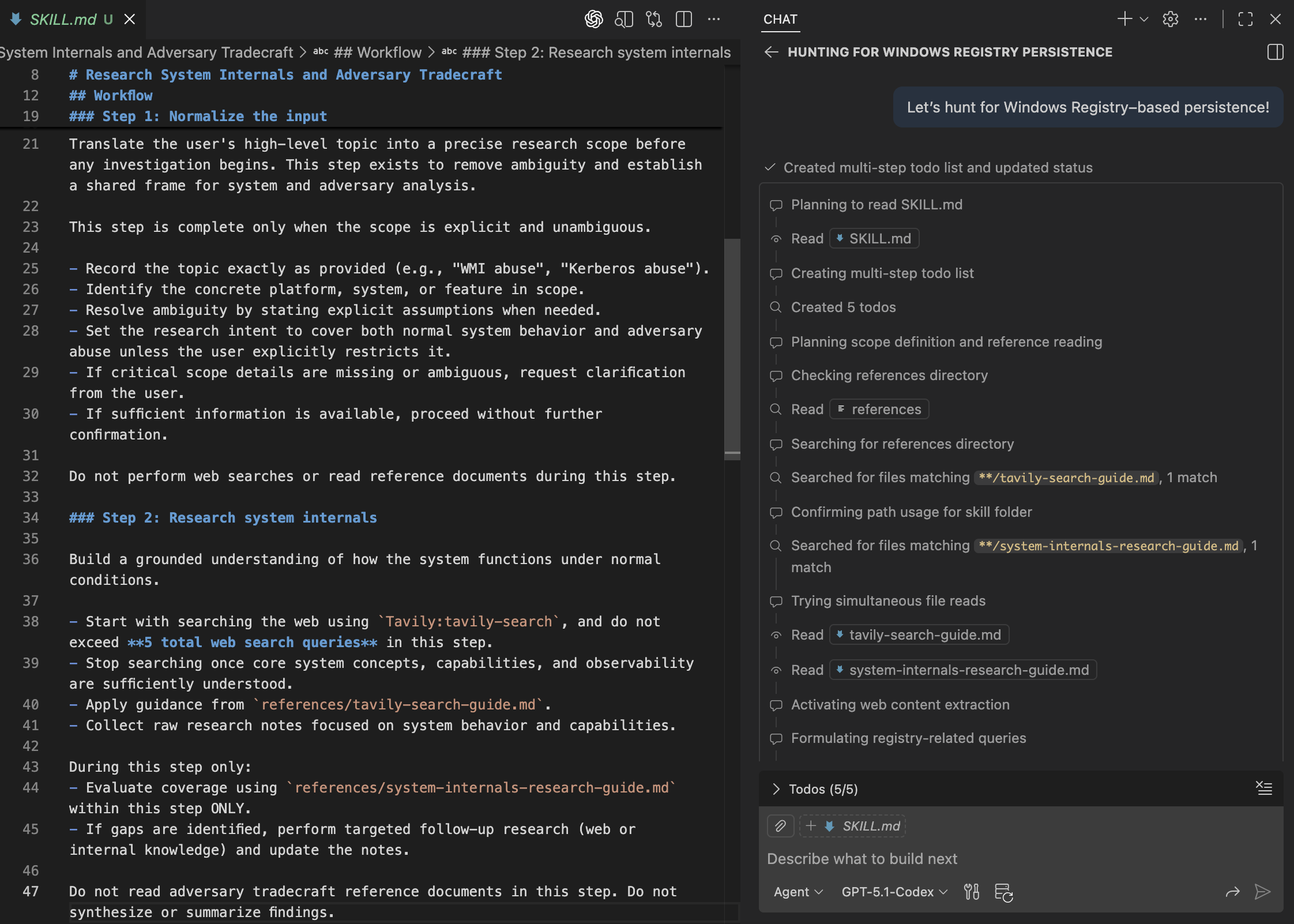
The agent starts by reading the SKILL.md file and proceeds without requesting clarification. It then begins researching Windows Registry behavior, applying the Tavily search guidelines and the system internals research guide as instructed.
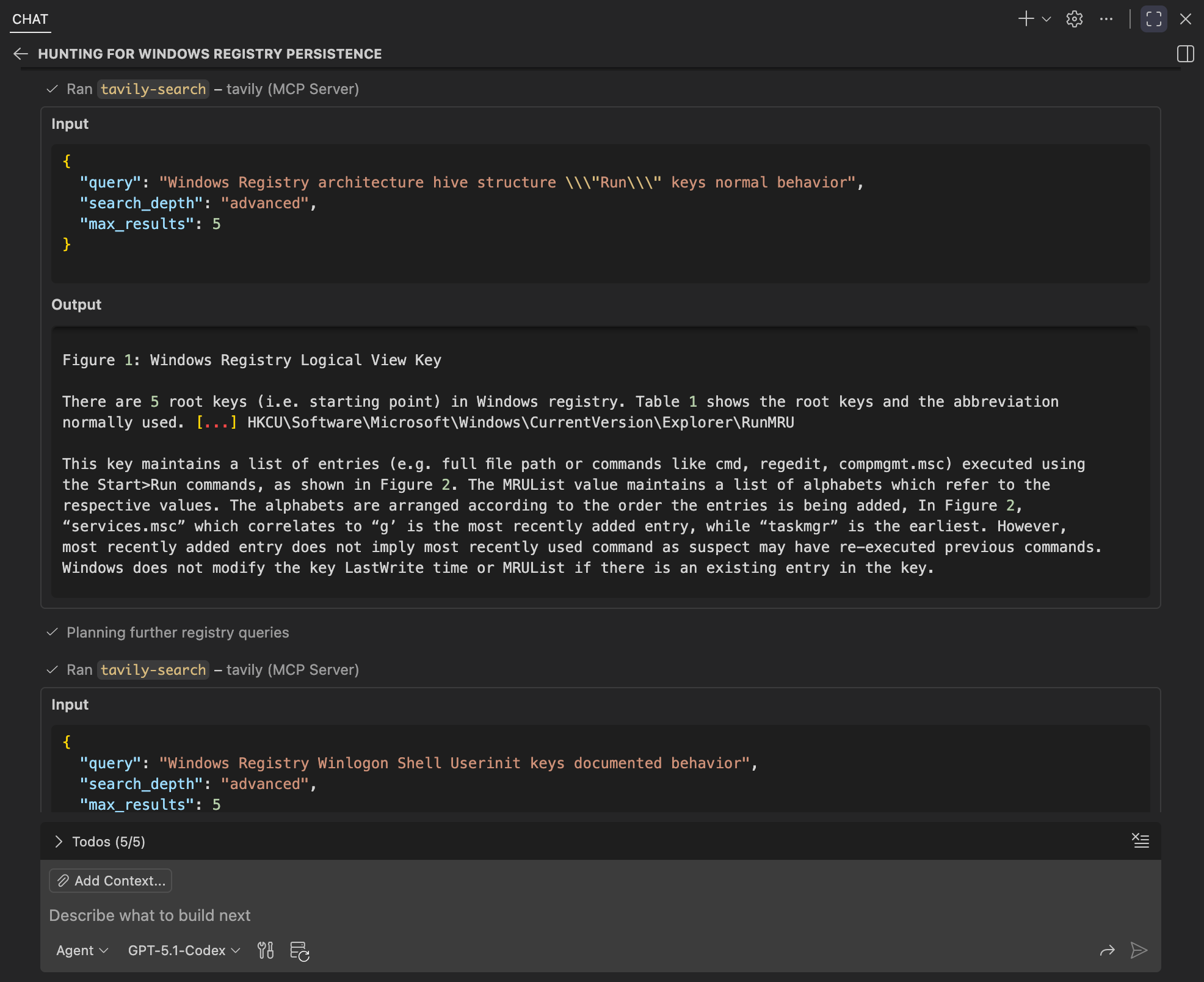
By inspecting the initial Tavily search queries, we can see that the agent prioritizes sources explaining Windows Registry structure and Run key behavior under normal conditions. This confirms the agent is grounding itself in system internals before expanding into abuse patterns.
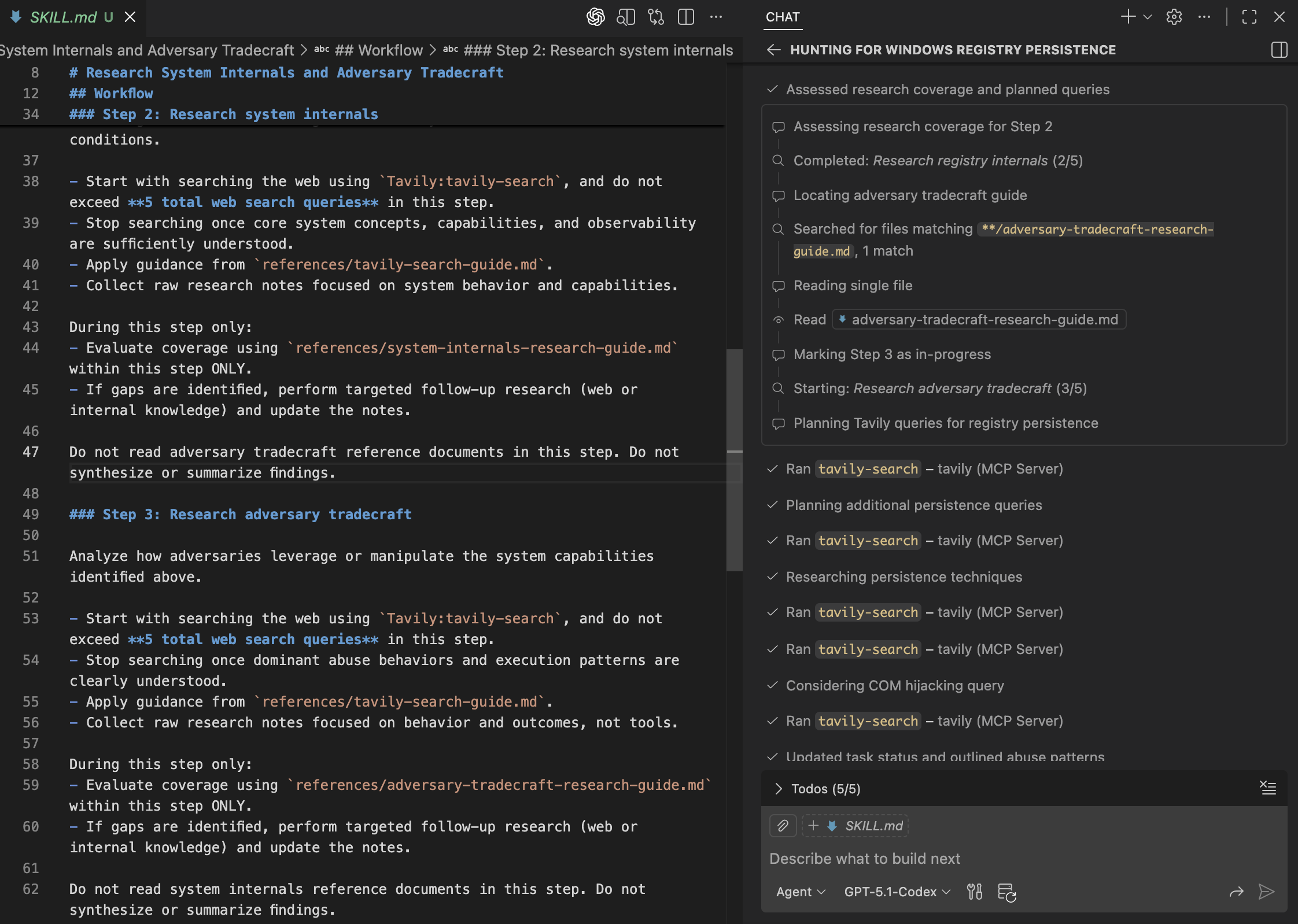
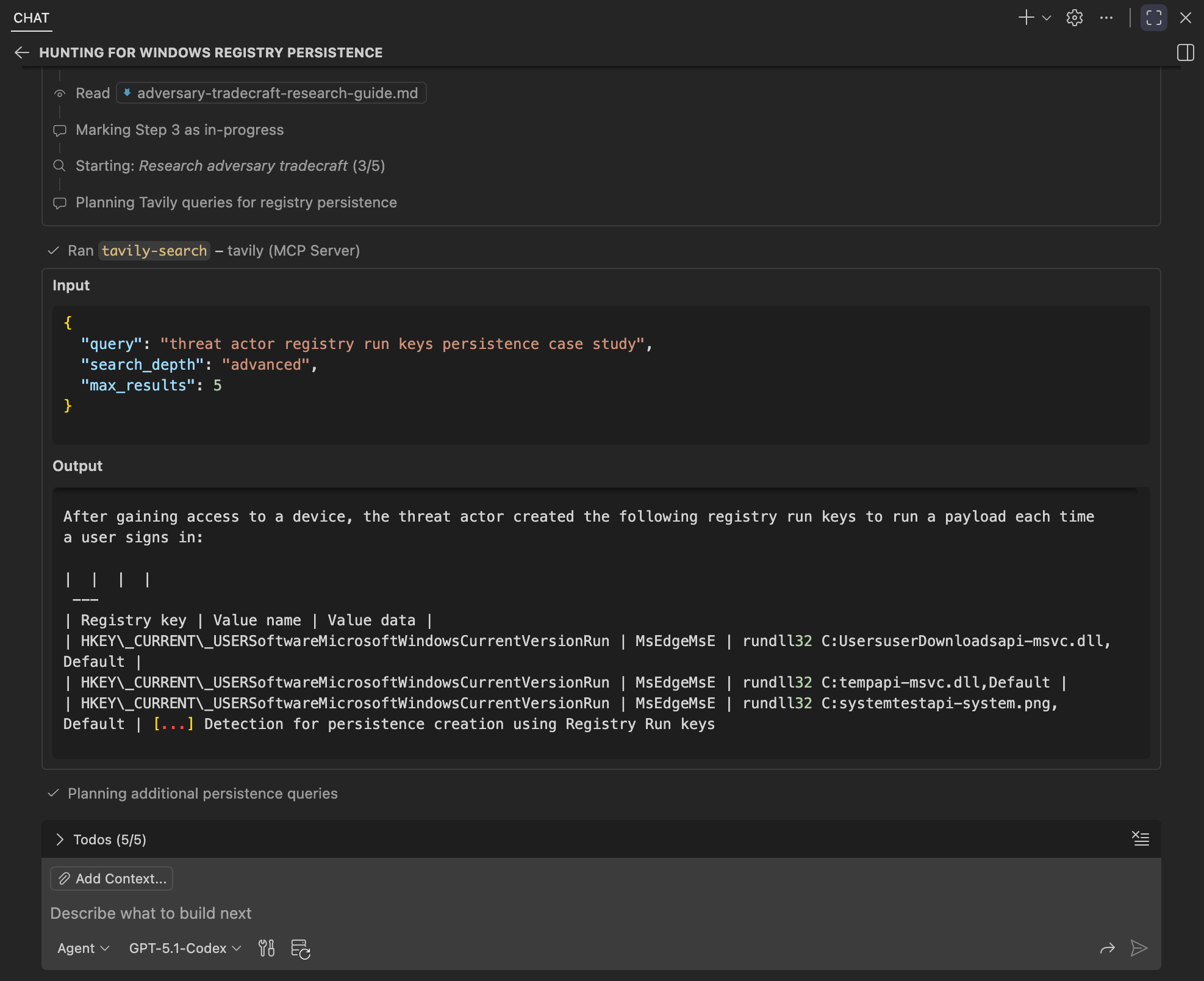
The agent then transitions into adversary tradecraft by reading the adversary tradecraft research guide and marking the next step as in progress. From there, it plans Tavily queries focused on registry-based persistence, structuring its research around attacker behaviors and outcomes.
Inspecting the Tavily search queries and results, we can see the agent shift from system internals to adversary case studies involving Registry Run key persistence. The retrieved sources focus on attacker behaviors and execution patterns.
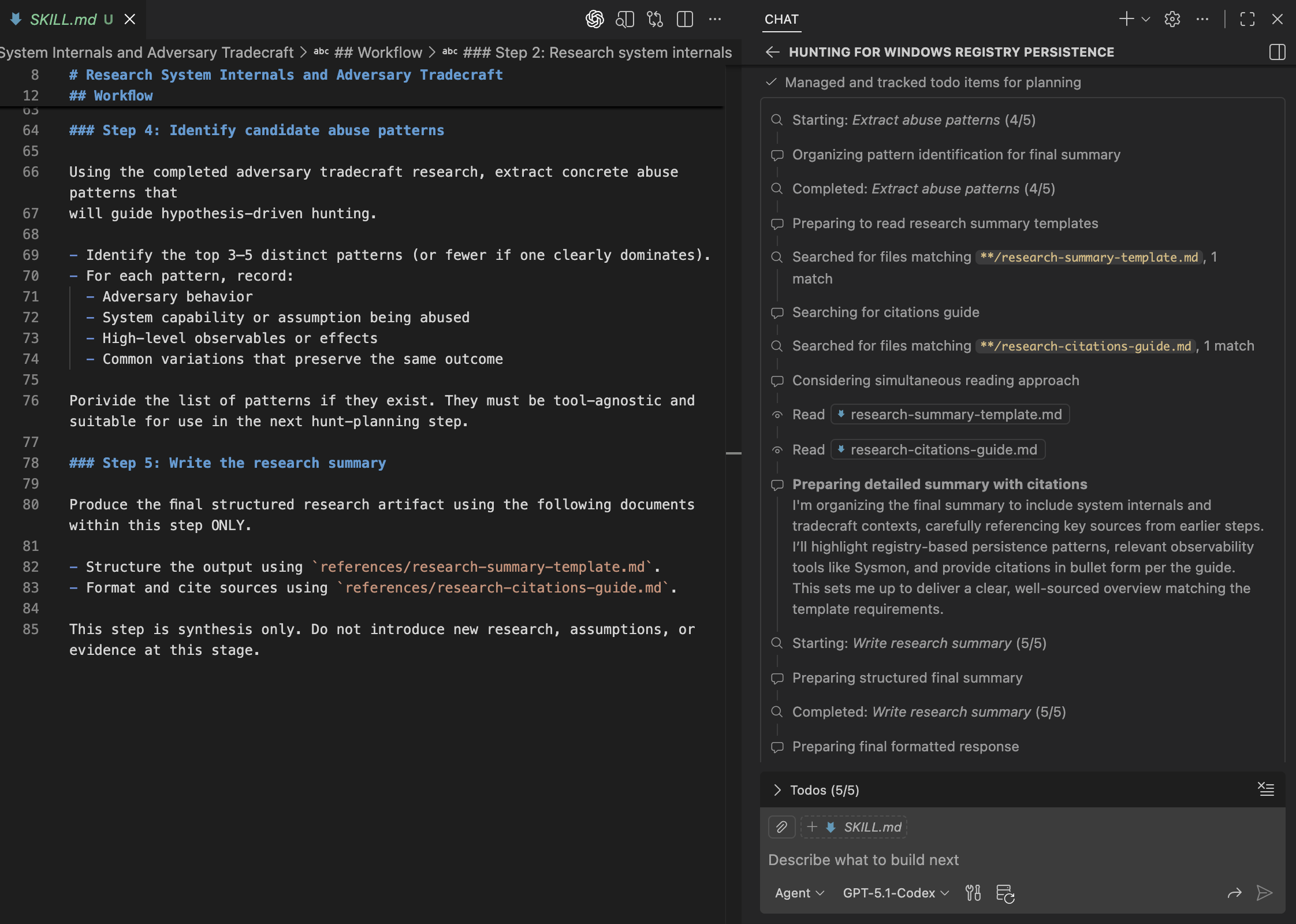
Inspecting the final steps, we can see the agent complete abuse pattern extraction and load the research summary template and citations guide. It then synthesizes the final report according to the prescribed structure and sourcing requirements.
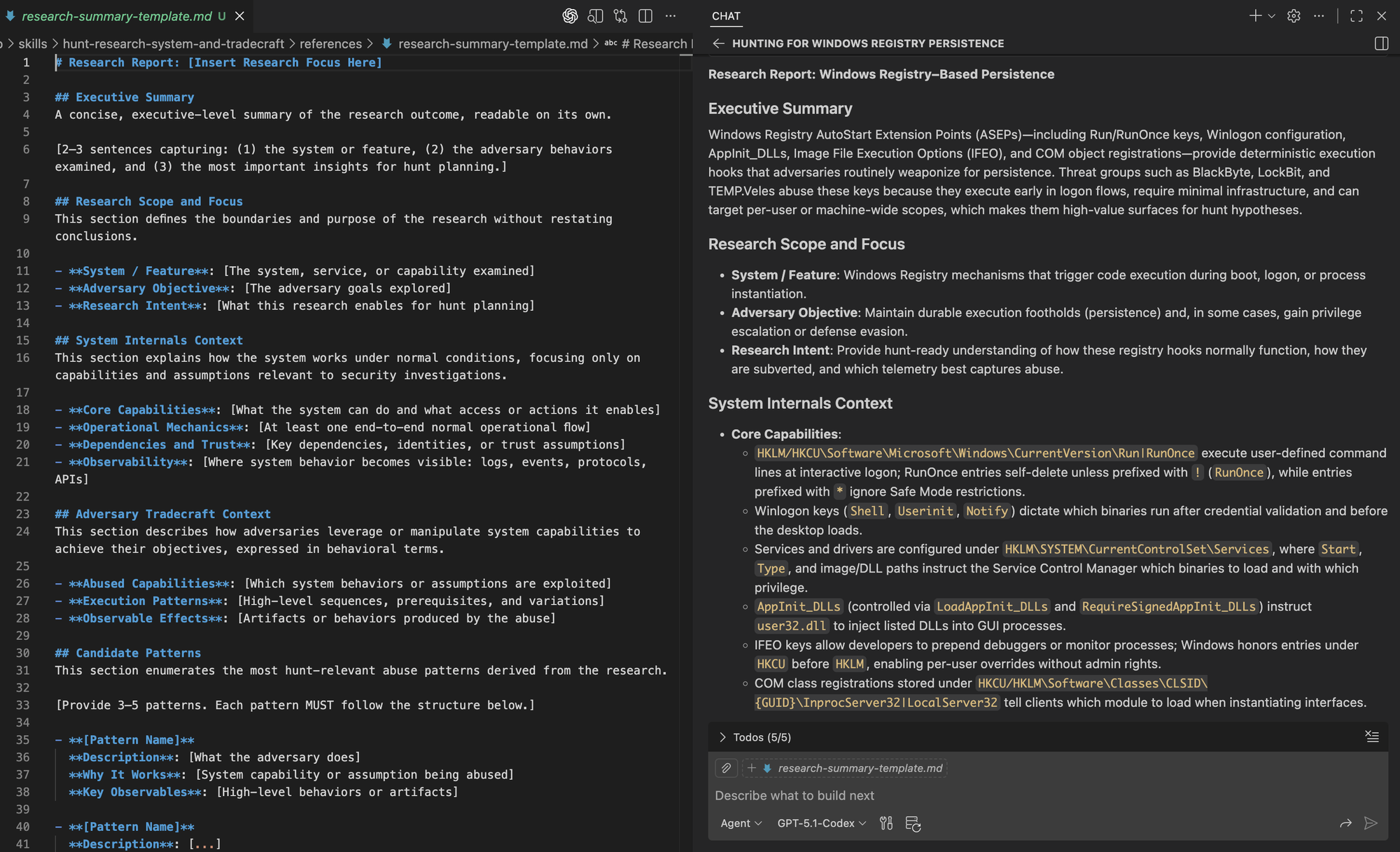
Comparing the template with the generated research summary, we can see that the agent follows the prescribed structure exactly.
Imagine extending this workflow by integrating tools or MCP servers connected to internal knowledge repositories, such as SharePoint or Confluence, as well as internal threat intelligence repositories. This would enrich hunt planning with organizational context related to system behavior and adversary tradecraft, helping align investigations with your environment.
Defining the Hunt Focus 🤖🔎
Once the technology and adversary behavior are understood, hunters must narrow that knowledge into a clear hunt focus by identifying a specific attack pattern, rather than starting with broad or generic questions. A well-defined focus helps avoid overly large hunts and ensures that later work is intentional, testable, and aligned with the environment.
In practice, this means defining more than a hunt title or hypothesis, including:
- What behavior or pattern is being investigated
- Why it matters in this environment
- Where (and eventually over what time window) it should be observed
While the where and time window may be defined at this stage, they are often finalized later when the hunt is assigned to a specific environment or operational scope. This keeps hunts reusable, while allowing assumptions, initial notes, and false positives to be tailored to specific parts of the environment.
Agents can assist by translating research and human input into a clear, testable hunt hypothesis that incorporates prior context and makes assumptions explicit. This definition guides data discovery and analytics development while allowing the hunt to evolve as new evidence emerges.
High-Level Workflow
- Synthesize Insights: Combine the hunt topic, system internals, and adversary tradecraft.
- Select Attack Pattern: Identify the most relevant attack pattern based on the synthesized insights.
- Generate Hypothesis: Develop a structured hypothesis with a clear title and explanation.
Skill Artifacts
This workflow is packaged with the following supporting artifacts:
- SKILL.md: Defines when the skill should be used and outlines the steps the agent follows to synthesize research into a focused hypothesis for the hunt.
- References:
- hypothesis-template.md: A simple template for documenting the structure of the hypothesis.
We then extend our skills by creating a new directory under the skills folder.
Repository: https://github.com/OTRF/ThreatHunter-Playbook/tree/main/.github/skills/hunt-focus-definition
.github/
└── skills/
    ├── hunt-research-system-and-tradecraft/
    │   ├── SKILL.md
    │   └── references/
    │       ├── tavily-search-guide.md
    │       ├── system-internals-research-guide.md
    │       ├── adversary-tradecraft-research-guide.md
    │       ├── research-summary-template.md
    │       └── research-citations-guide.md
    └── hunt-focus-definition/
        ├── SKILL.md
        └── references/
            └── hypothesis-template.md
Testing Agent Skill
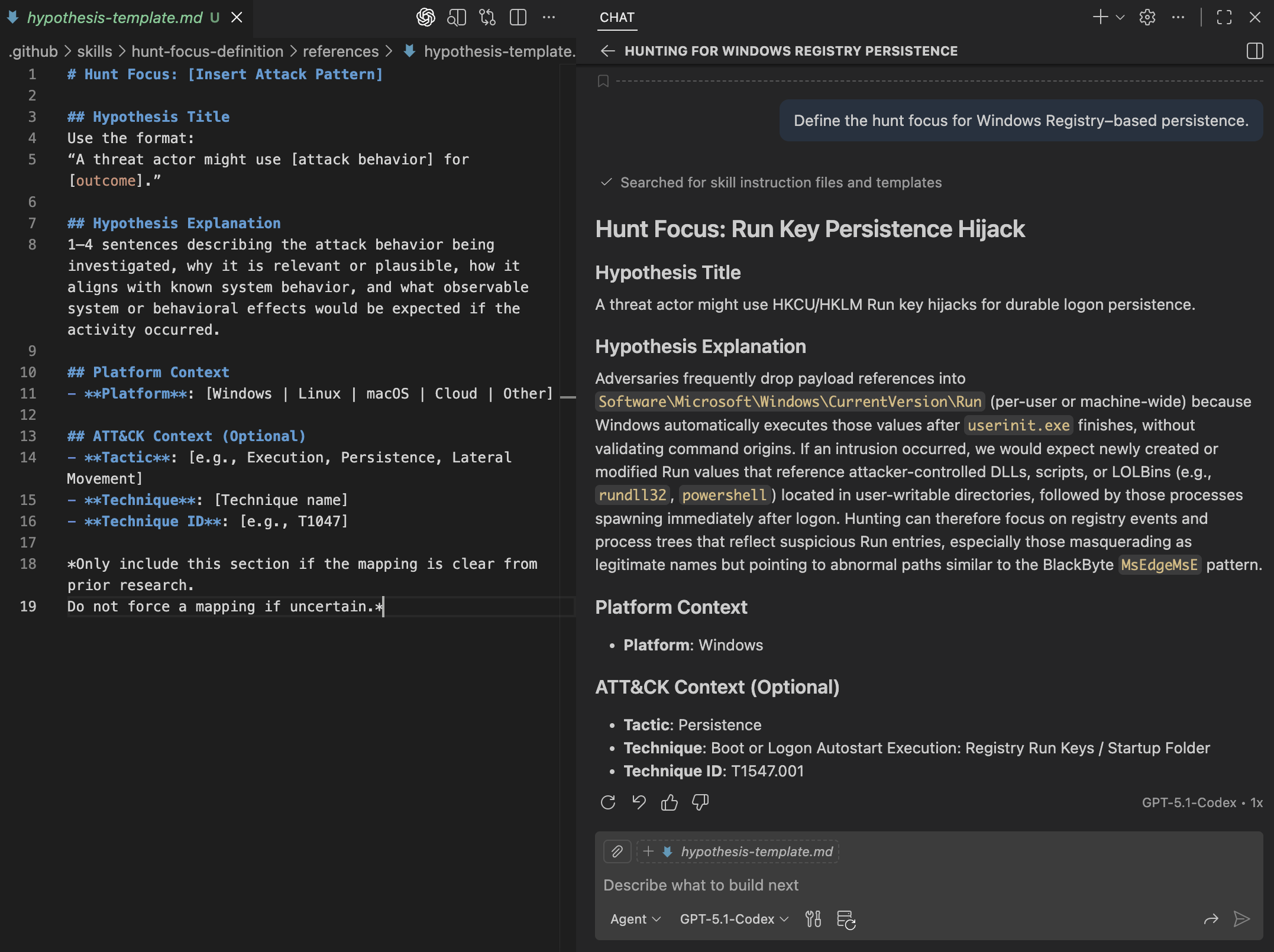
Building on the research from the previous step, we can now ask the agent to define a focused hunt for Windows Registry-based persistence.
Define the hunt focus for Windows Registry–based persistence.Right away, we see the agent selecting the correct skill and reading the associated SKILL.md and hypothesis template to structure its output.
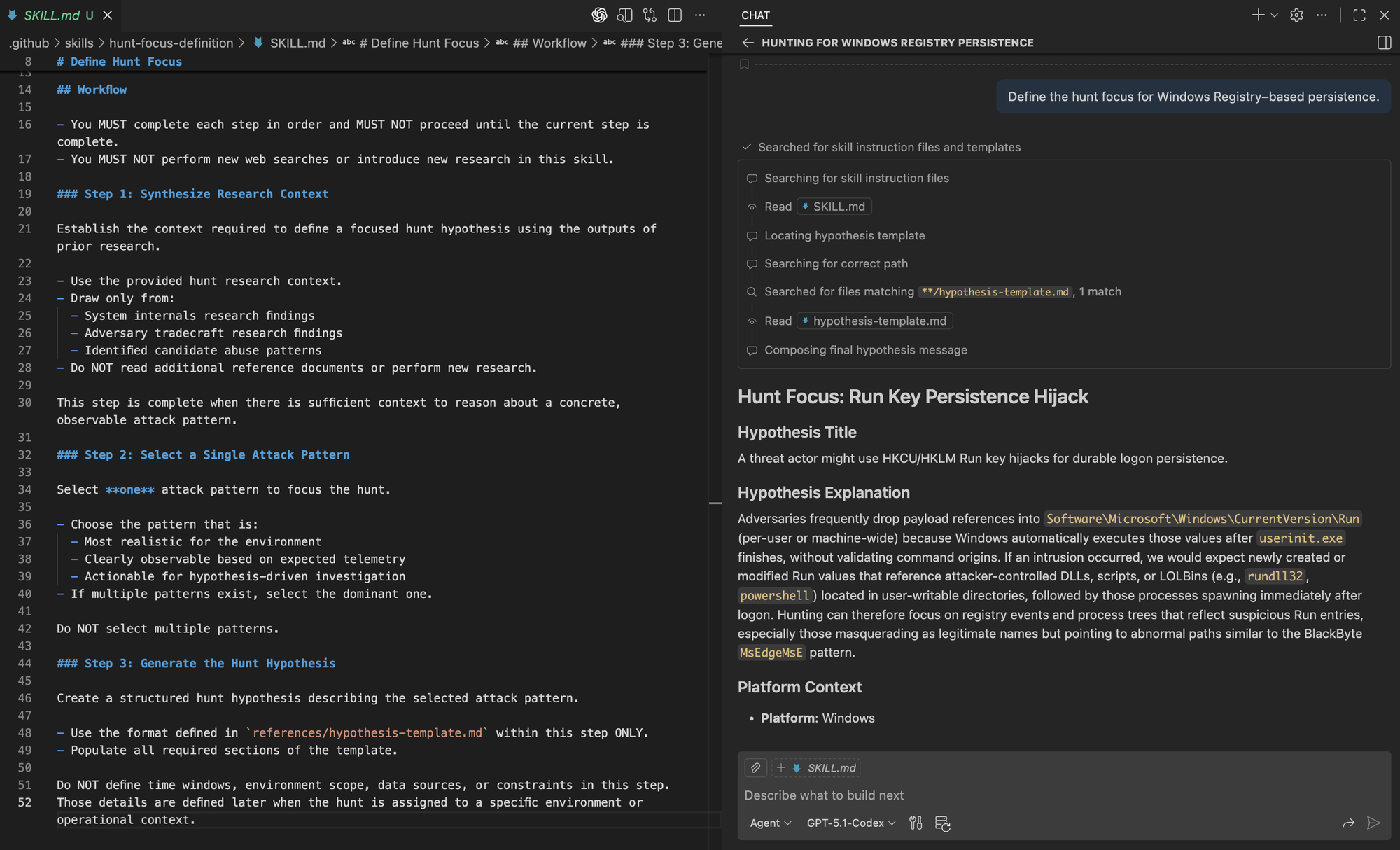
The resulting hypothesis follows the prescribed structure and is shown below.
Identifying Relevant Data Sources 🤖🪵
Once the initial context is gathered and the hunt focus is defined, the next step is identifying which data sources can be used to look for that behavior. At this stage, hunters need to answer a practical question: which security events in this environment could realistically capture the activity if it were happening?
Agents support this step by leveraging existing telemetry catalogs provided by the underlying platform (for example, a SIEM or data lake). These catalogs already organize schemas and tables across data stores, allowing agents to explore available telemetry without reasoning over every schema manually.
Note: The organization and indexing of schemas happens ahead of time and is platform-specific. This may involve schema catalogs, semantic indexing, or graph-based representations that make tables and fields discoverable. This is a prerequisite of the hunt planning workflow.
The focus here is on data source retrieval as part of planning. Agents use the hunt intent to query existing catalogs, identify candidate data sources, refine relevance as new findings emerge, and surface gaps where expected telemetry does not exist. By assisting with retrieval, agents help ground hunts in real data and make planning easier to adapt as context evolves.
High-Level Workflow
- Interpret Hunt Focus
Understand the investigative intent defined by the structured hunt hypothesis, including the attack behavior, platform, and type of activity that must be observable, without assuming specific data sources. - Discover Candidate Data Sources
Use semantic search over the existing telemetry catalog to identify data sources whose schemas and descriptions suggest they could capture the expected behavior. - Refine and Validate Relevance
Narrow the candidate data sources based on schema alignment with the observable activity, make planning-level assumptions explicit, and surface conceptual gaps where expected categories of telemetry are not represented. - Produce Data Source Summary
Document the final set of candidate data sources using a structured summary that captures purpose, relevant schema elements, and planning-level gaps or assumptions, without including queries or execution logic.
This workflow can be repeated throughout the execution of the hunt as context and findings evolve.
Skill Artifacts
This workflow is packaged with the following supporting artifacts:
- SKILL.md
Defines when the skill should be used and how the agent translates hunt intent into candidate data sources using telemetry catalog search. - References
- data-source-summary-template.md
A template for documenting candidate data sources, their intended purpose, relevant schema elements, and planning-level gaps or assumptions.
- data-source-summary-template.md
We continue to extend our skills by adding a new directory.
Repository: https://github.com/OTRF/ThreatHunter-Playbook/tree/main/.github/skills/hunt-data-source-identification
.github/
└── skills/
    ├── hunt-research-system-and-tradecraft/
    │   ├── SKILL.md
    │   └── references/
    │       ├── tavily-search-guide.md
    │       ├── system-internals-research-guide.md
    │       ├── adversary-tradecraft-research-guide.md
    │       ├── research-summary-template.md
    │       └── research-citations-guide.md
    ├── hunt-focus-definition/
    │   ├── SKILL.md
    │   └── references/
    │       └── hypothesis-template.md
    └── hunt-data-source-identification/
        ├── SKILL.md
        └── references/
            └── data-source-summary-template.md
Testing Agent Skill
With the hunt focus defined, we can now ask the agent to identify relevant data sources for the Windows Registry–based persistence hunt.
Identify relevant data sources for the Windows Registry–based persistence hunt.As we extend the workflow, the Chat Debug view in VS Code shows the agent gaining context for additional skills. In the image below, we can see how it applies the right skill to search for relevant data sources as instructed.
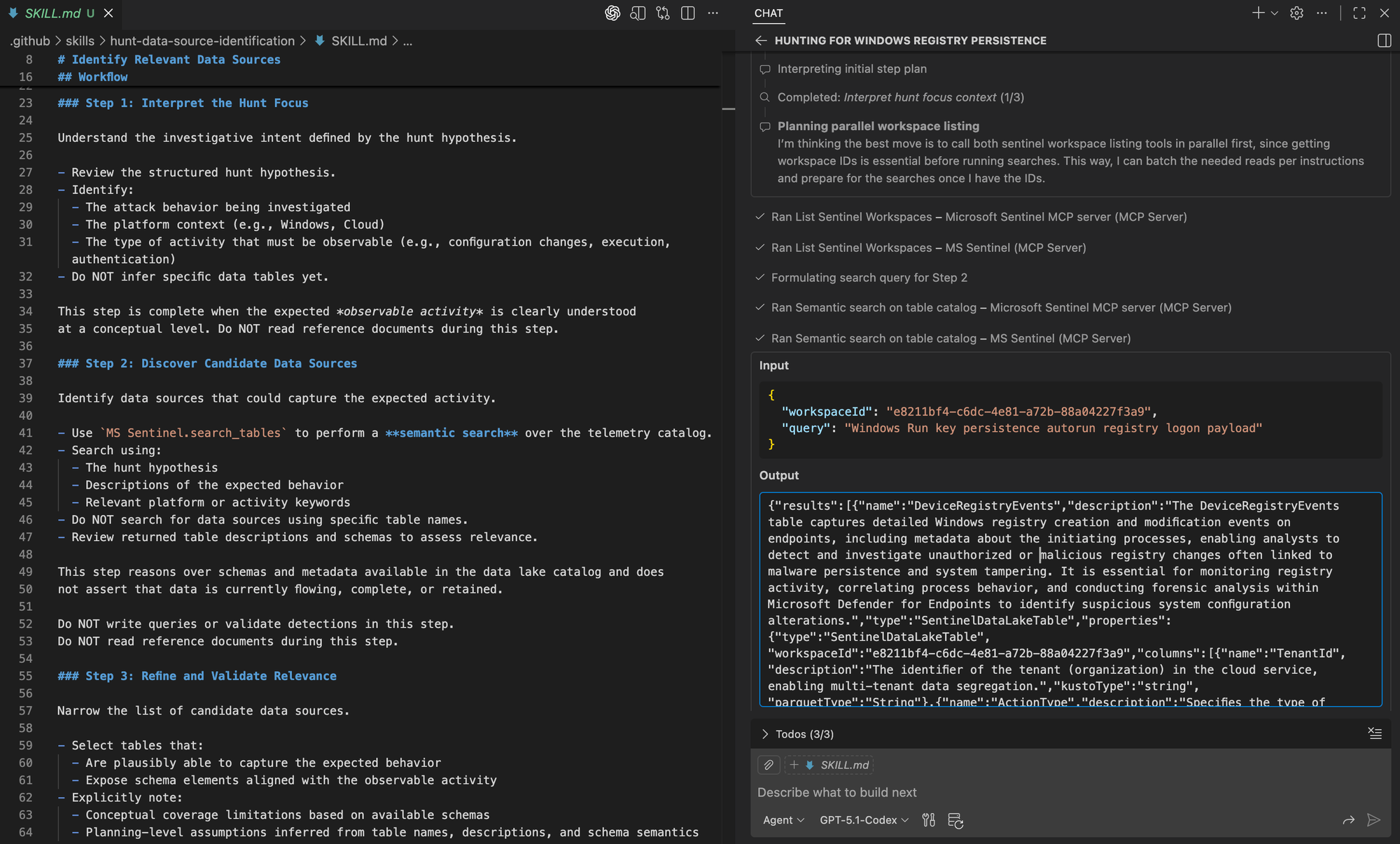
The agent proceeds by interpreting the hunt focus and using semantic schema search in Microsoft Sentinel to identify candidate data sources in the data lake.
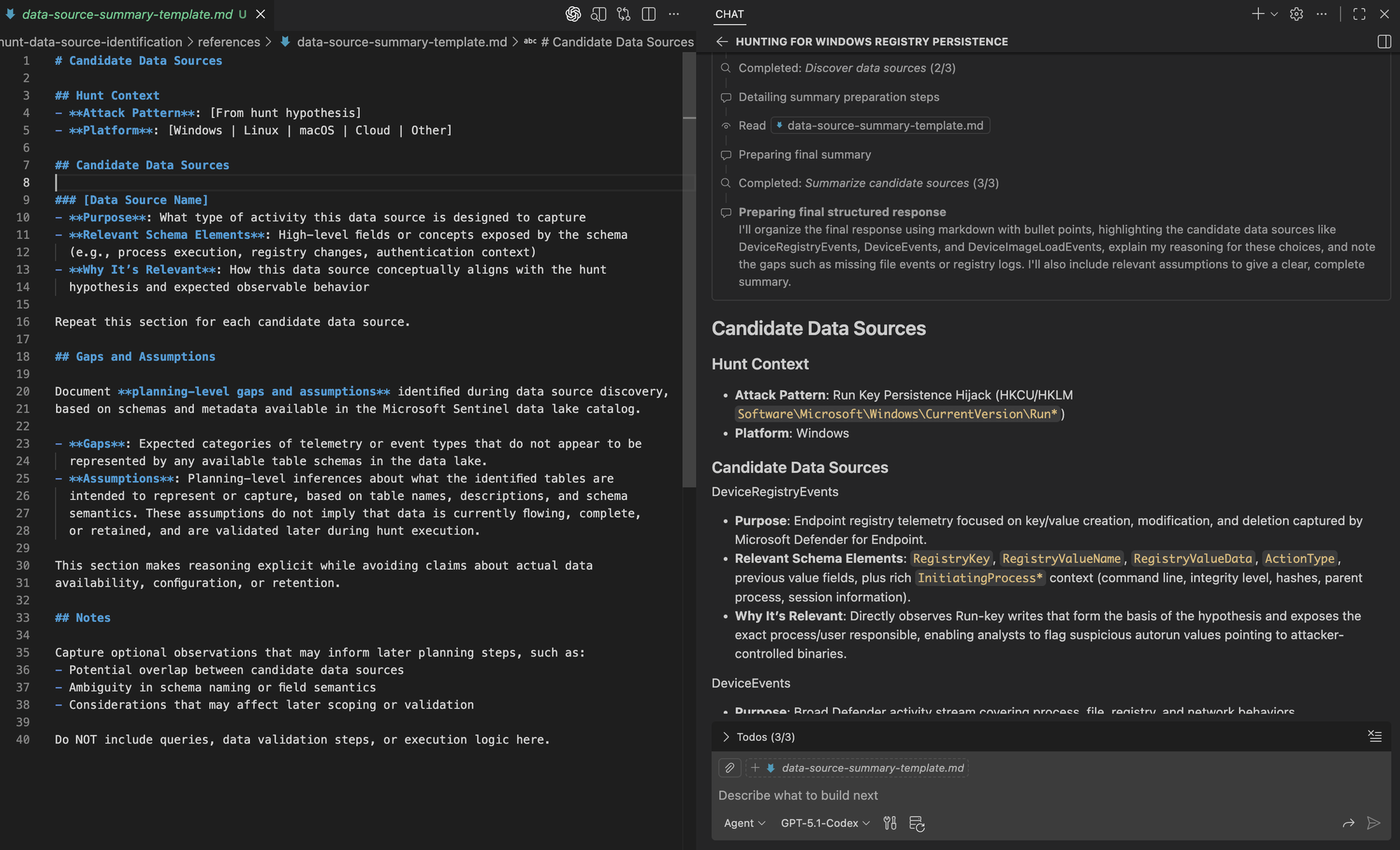
Finally, we can see the agent mark the earlier steps as complete before loading the data source summary template and producing the final output. The resulting summary aligns with the prescribed structure.

Generating Analytics 🤖🏹
With the hunt focus defined and relevant data sources identified, the next step is developing analytics that describe how adversary behavior should manifest in data. This stage is about translating investigative intent into analytic definitions, not running queries or validating detections.
At this stage, hunters and agents use system internals, adversary tradecraft, the hunt hypothesis, and candidate data sources to define a small set of analytics. Each analytic models adversary behavior through entities, relationships, and relevant fields. The goal is not to determine what is suspicious or anomalous, which requires context beyond adversary descriptions or schema inspection.
High Level Workflow
- Interpret and Normalize Input
Use the available context, including the hunt focus and candidate data sources, to understand the behavior that must be represented analytically. If critical context is missing, request minimal clarification about the specific behavior being hunted before proceeding. - Generate Analytic Candidates (repeat up to 5 times)
For each analytic candidate:
- Select the most relevant data source or sources from the candidate list
- Review the associated table schemas to understand available fields and attributes
- Identify the key entities involved, such as process, user, host, registry key, or IP address
- Model the behavior as relationships between entities, using a graph-like view to represent how the activity unfolds and the conditions that matter
- Ground the logic by mapping entities and conditions to schema fields
- Capture a query-style representation, such as SQL-like logic, to express analytic intent
- Produce an Analytics Summary
Summarize the final set of analytics in a consistent structure, including the reasoning, selected data sources, key entities, and the query-style representation for each analytic.
Skill Artifacts
This workflow is packaged with the following supporting artifacts:
- SKILL.md
Defines when the analytics generation skill should be used and enforces the step by step workflow for translating hunt intent into query agnostic analytics grounded in schema semantics - References
- analytic-template.md: Defines the per analytic structure used to capture analytic intent, selected data sources, entities, graph like behavioral model, schema grounding, and SQL like representation as a planning artifact
We continue to extend our skills by adding a new directory.
Repository: https://github.com/OTRF/ThreatHunter-Playbook/tree/main/.github/skills/hunt-analytics-generation
.github/
└── skills/
    ├── hunt-research-system-and-tradecraft/
    │   ├── SKILL.md
    │   └── references/
    │       ├── tavily-search-guide.md
    │       ├── system-internals-research-guide.md
    │       ├── adversary-tradecraft-research-guide.md
    │       ├── research-summary-template.md
    │       └── research-citations-guide.md
    ├── hunt-focus-definition/
    │   ├── SKILL.md
    │   └── references/
    │       └── hypothesis-template.md
    ├── hunt-data-source-identification/
    │   ├── SKILL.md
    │   └── references/
    │       └── data-source-summary-template.md
    └── hunt-analytics-generation/
        ├── SKILL.md
        └── references/
            └── analytic-template.md
Testing Agent Skill
With the hunt focus defined and relevant data sources identified, we can now ask the agent to generate analytics for the Windows Registry–based persistence hunt.
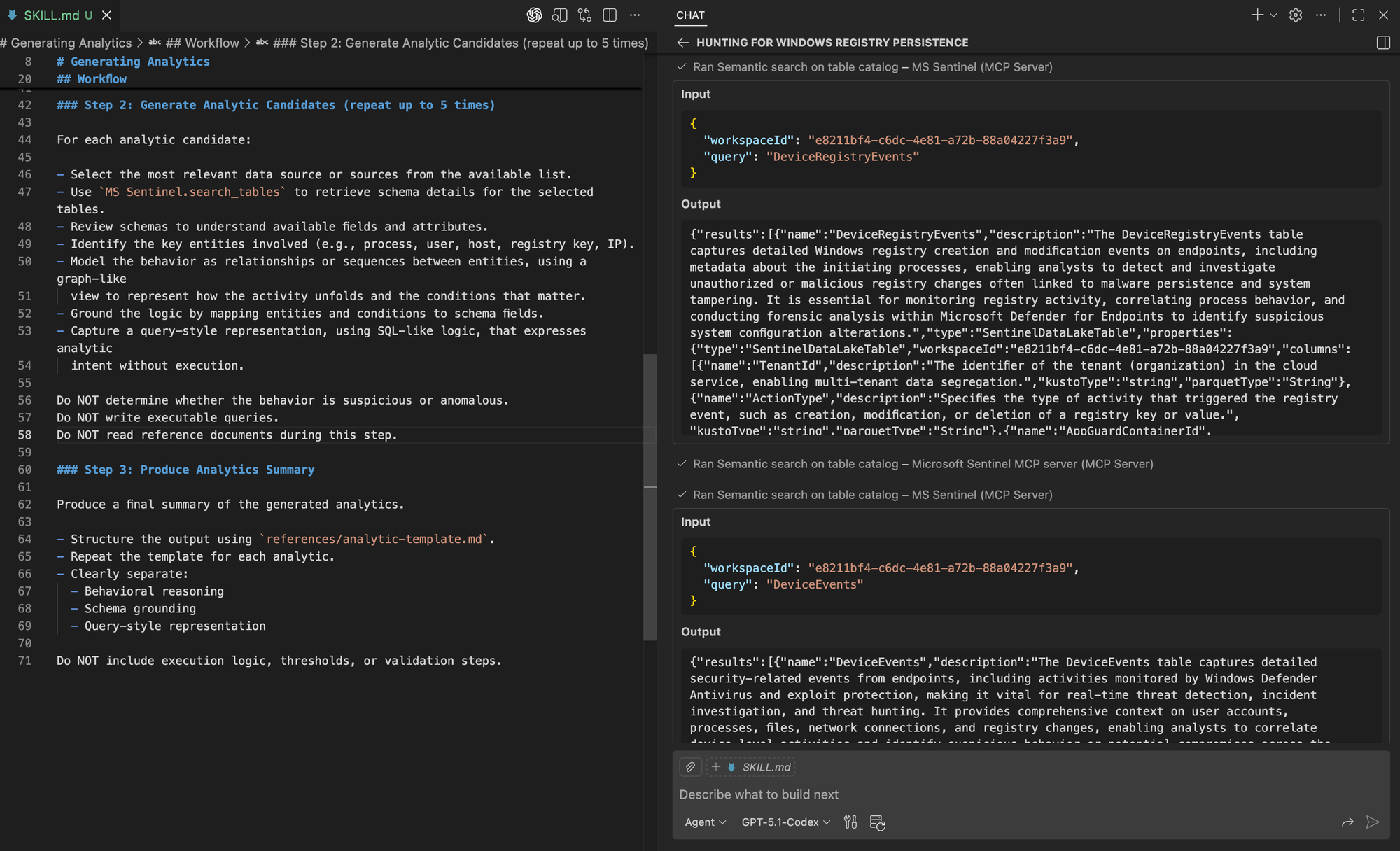
Generate analytics for the Windows Registry–based persistence hunt.Focusing on the analytics generation step, we can see the agent selecting specific tables from the candidate data sources and retrieving their schemas to understand the available fields.
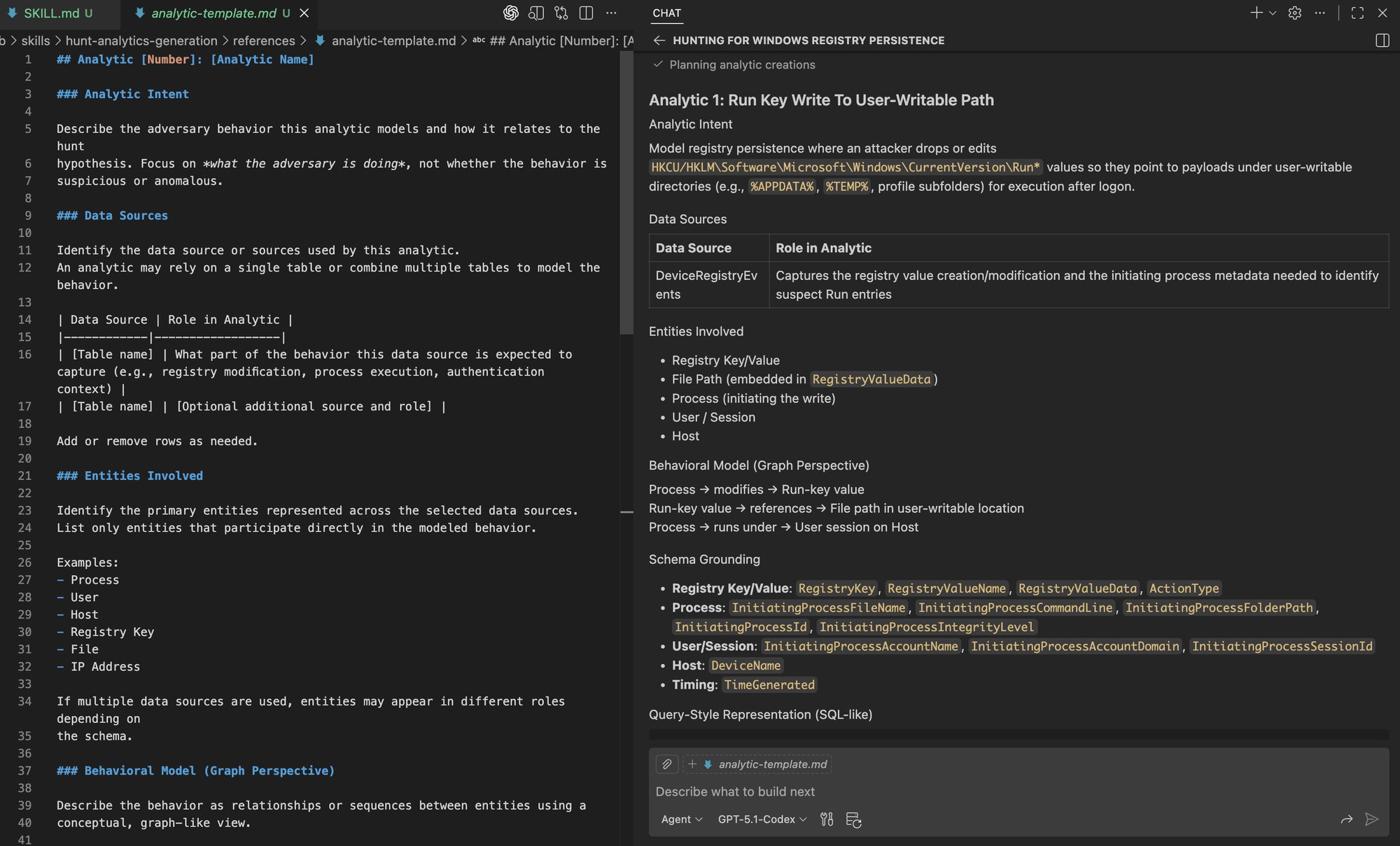
We can then see the analytic being generated using the template, capturing the reasoning and modeling decisions behind it. This reflects the same investigative trajectory we expect from a hunter, now consistently reproduced by the agent.
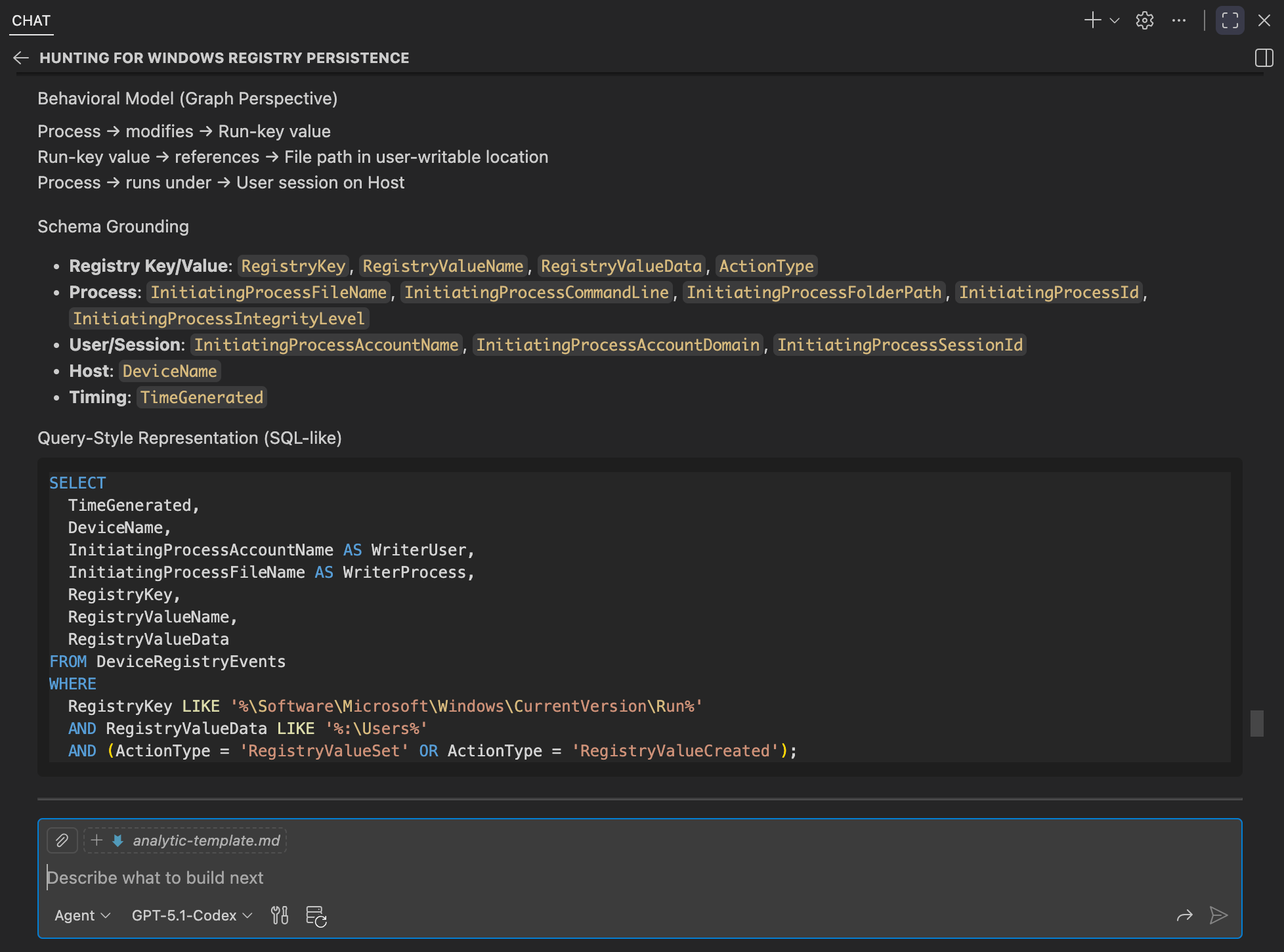
When defining analytics, it’s important to remember that these can be complemented with additional analysis techniques, such as aggregation, stacking, or frequency-based analysis, to surface common or baseline behaviors in the environment. Those techniques may live in separate data analysis–focused skills, while hunt analytics remain centered on modeling adversary behavior using structured logic. Agents should not be expected to infer what is suspicious or anomalous on their own; that determination is best exposed through dedicated analysis techniques or models trained on the environment’s global data view.
It is also important to capture the hunter’s reasoning and trajectory that led to each analytic, which is why the structured template and graph-like representation matter. When analytics are later expressed in a specific query languge, providing query-specific guidance can help mitigate common LLM failure modes (such as timestamp handling) and improve the quality and reliability of generated queries.
Generating a Hunt Blueprint 🤖📝
As hunt planning comes together, the outputs of each step need to be captured in a structured way that can guide execution. A hunt blueprint consolidates the hunt’s intent, context, analytics, and constraints into a single, coherent plan rather than scattered notes across workflows.
A Threat Hunter Playbook hunt blueprint typically captures the hunt focus and scope, relevant system and technical context, adversary tradecraft being investigated, candidate analytics, assumptions and expected behavior, potential sources of noise, and any environment or time constraints. This blueprint serves as the primary handoff into execution and as a durable artifact that can inform future hunts and organizational context.
Agents assist by assembling and maintaining the blueprint from earlier workflows, ensuring the planning trajectory and reasoning are preserved as the hunt evolves.
High-Level Workflow
The blueprint generation follows a repeatable, synthesis-focused workflow:
- Aggregate Planning Outputs
Collect the outputs produced by prior hunt planning skills, including system and adversary research, the structured hunt hypothesis, identified candidate data sources, and generated analytics. - Structure the Hunt Blueprint
Organize the collected inputs into a single, coherent blueprint that preserves investigative intent, contextual grounding, and analytic structure using a consistent, predefined format. - Capture Assumptions and Gaps
Explicitly document planning-level assumptions, limitations, and known gaps that affect how the hunt should be executed or interpreted, without asserting data availability or outcomes. - Generate the Final Blueprint
Produce a validated, hunt blueprint as a structured Markdown document that can be handed off to execution workflows and iterated on as the hunt evolves.
Skill Artifacts
This workflow is packaged with the following supporting artifacts:
- SKILL.md
Defines when the blueprint skill should be used and how the agent assembles outputs from earlier workflows into a unified hunt plan. - References
- hunt-blueprint-template.md: Defines the structure of the hunt plan, including sections for context, analytics, assumptions, and execution notes.
We continue to extend our skills by adding a final directory for hunt blueprint generation. This completes the core planning workflow by assembling research, hunt focus, data sources, and analytics into a single, execution-ready plan.
Repository: https://github.com/OTRF/ThreatHunter-Playbook/tree/main/.github/skills/hunt-blueprint-generation
.github/
└── skills/
    ├── hunt-research-system-and-tradecraft/
    │   ├── SKILL.md
    │   └── references/
    │       ├── tavily-search-guide.md
    │       ├── system-internals-research-guide.md
    │       ├── adversary-tradecraft-research-guide.md
    │       ├── research-summary-template.md
    │       └── research-citations-guide.md
    ├── hunt-focus-definition/
    │   ├── SKILL.md
    │   └── references/
    │       └── hypothesis-template.md
    ├── hunt-data-source-identification/
    │   ├── SKILL.md
    │   └── references/
    │       └── data-source-summary-template.md
    ├── hunt-analytics-generation/
    │   ├── SKILL.md
    │   └── references/
    │       └── analytic-template.md
    └── hunt-blueprint-generation/
        ├── SKILL.md
        └── references/
            └── hunt-blueprint-template.md
Testing Agent Skill
With research, hunt focus, data sources, and analytics defined, we can now ask the agent to generate a hunt blueprint for our hunt.
Generate a hunt blueprint for the Windows Registry–based persistence hunt.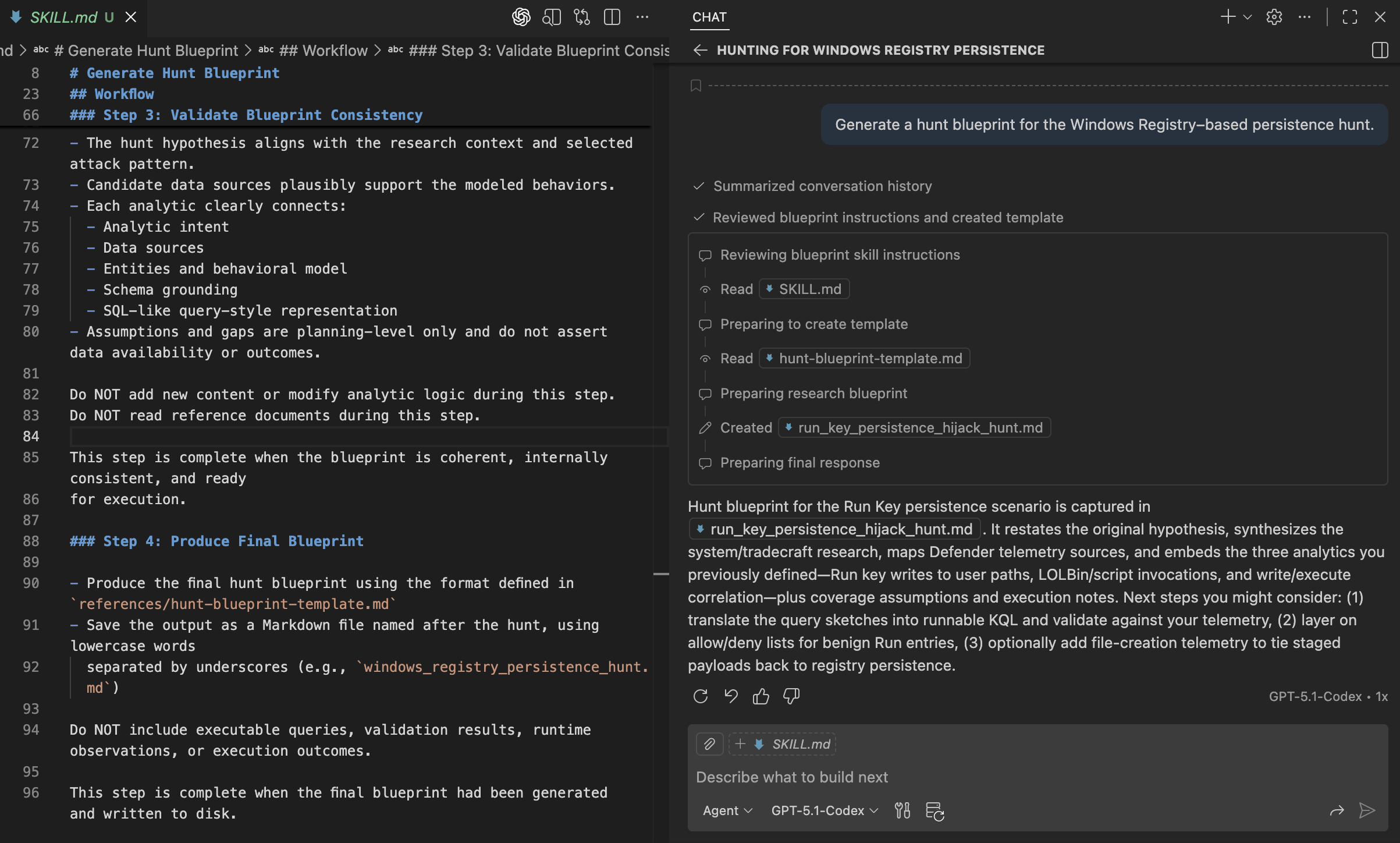
Finally, we can see the blueprint file being generated and written in a format that closely aligns with an existing Threat Hunter Playbook, preserving the structure and reasoning hunters already expect.
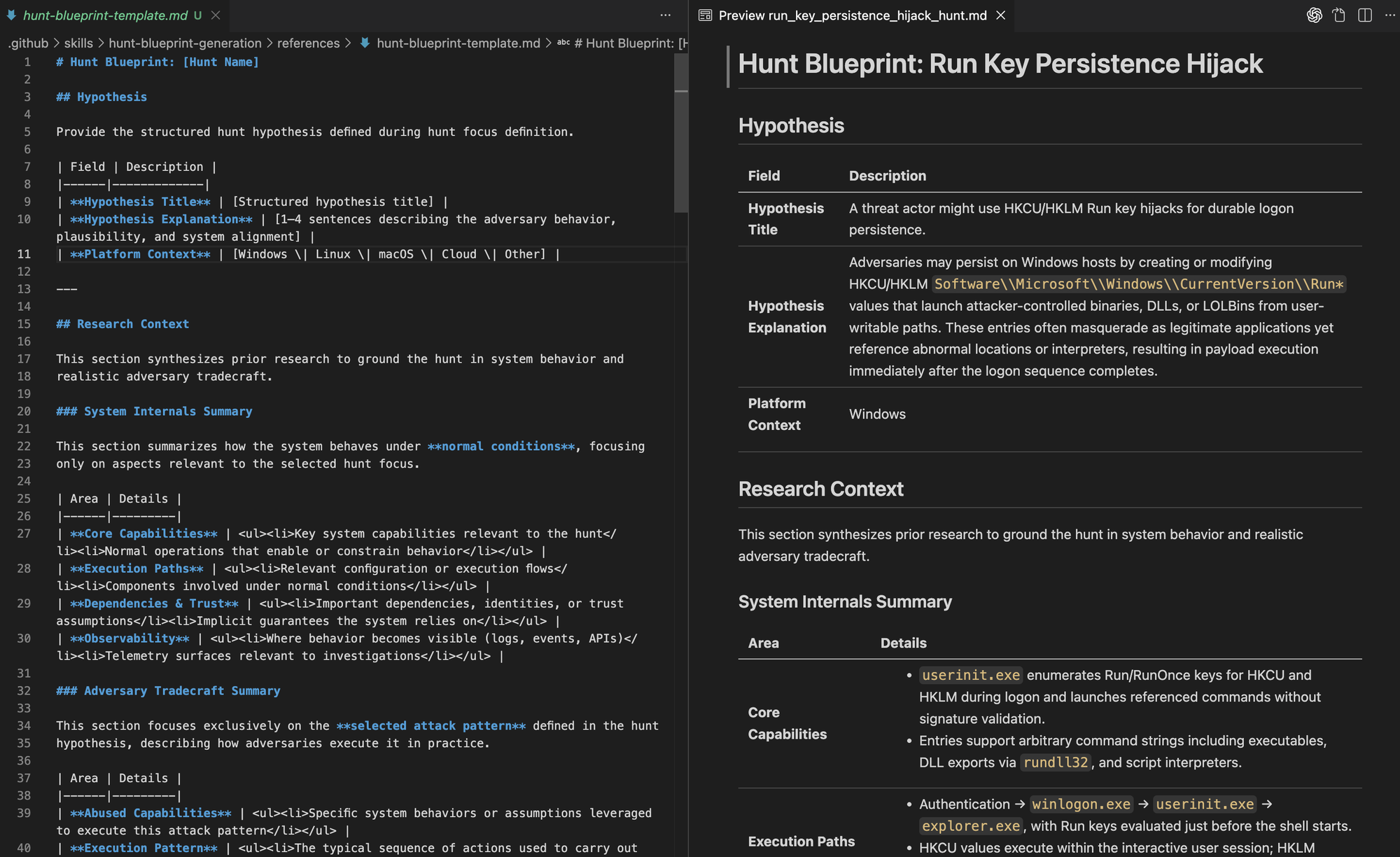
It’s important to note that this is a reference implementation of agent skills. A foundation for moving from a hunt idea to a well-structured report that captures context, reasoning, and intent, and that can later be translated into executable documents or concrete hunt queries as needed.
Up to this point, we have defined the planning workflows needed to move from a hunt idea to an execution-ready blueprint. Each workflow is intentionally self-contained so it can be reused independently, which raises the question of how to run them end to end, in the right order, without collapsing them into a single skill.
Orchestrating Skills with a Single Prompt 🤖🧩
One way to orchestrate skills is to provide a single prompt that describes the hunt goal and desired outcome and let the agent determine which skills to apply and in what order. Because the name and description of each skill are added to the system prompt, the agent has enough context to decide what to read and execute first. The sequencing ultimately depends on the model’s reasoning but can be guided by including high level workflow expectations in the prompt.
In the example below, the prompt provides that guidance, and the video that follows shows that while multiple skills are read up front, reference documents are accessed progressively only at the steps where they are needed.
Plan a threat hunt for Windows Registry–based persistence.

Execute the hunt planning workflow step by step, using the appropriate agent skill
for each phase:

1. Research system internals and adversary tradecraft.
2. Define a focused hunt hypothesis.
3. Identify relevant data sources.
4. Generate hunt analytics.
5. Assemble the final hunt blueprint.

Complete each step fully before moving to the next.
Do not provide intermediate updates or progress messages.
Only respond after completing the final step.

Write the final hunt blueprint to disk as:
windows_registry_persistence_hunt.md
Closing Thoughts
Agent Skills provide a structured way to capture and share operational knowledge using progressive disclosure. They make it easier for subject matter experts to formalize how they work and expose planning workflows to agents in a way that preserves structure, reasoning, and intent.
- Agent Skills add structure to autonomy. Agents still reason and act independently, but within defined workflows rather than free-form execution. This allows known operational workflows to be encoded directly into how agents plan and act, while providing a foundation for agents to explore and extend beyond those workflows as new cases emerge.
- Progressive disclosure is the core design principle. Agents do not need all context up front. They start with lightweight metadata, load the relevant workflow only when needed, and access supporting references only when they are required throughout the workflow.
- Tools and skills complement each other. MCP servers provide access to environment specific data and knowledge. Skills provide the structure for how to use those tools consistently during planning.
- Hunt planning requires a way to discover what data is available. Rather than asking the model to reason over all schemas, systems should expose searchable telemetry catalogs and let the agent generate the right queries to search and map hunt intent to relevant data sources.
- Defining analytics is about representing attack behavior in data. Whether that behavior is suspicious or anomalous depends on environment specific analysis and validation. Agents then use that context throughout the hunt rather than inferring it directly from the raw data.
- Evaluation is required for every skill. Outputs and execution traces should be reviewed to identify failure modes, missing context, and incorrect assumptions before relying on the workflow.
- Durable execution remains important. Long-running hunts and multi-step workflows benefit from durable state, checkpointing, and resumability. While not explored here, this becomes increasingly important as agent-driven workflows span longer timeframes, tools, and investigative contexts.
Rather than creating new solutions to explain structured, AI-augmented threat hunting, this work builds directly on the Threat Hunter Playbook. The project already emphasized structure, reasoning, and reusable workflows, which makes it a natural foundation for this evolution. In future posts, we will explore how the same approach applies to execution and reporting. We will continue extending this model across related projects, including HELK and OSSEM, by revisiting and evolving existing work rather than creating new ones.
All the Agent Skills in this blog post are now part of the Threat Hunter Playbook
 OTRF
OTRF